The mental load · August 21, 2026 · 6 min read
Free Christmas Card Address List Template (Excel)
Download a free Christmas card address list template in Excel to track mailing labels, sent dates, returns, corrections, and next-year decisions.

A returned Christmas card often arrives after the card list has stopped feeling like a current task. The envelopes are gone. The stamps have been put away. One small correction lands with the ordinary mail and may sit beside the keys until somebody writes “moved?” on a scrap of paper that won't make sense next November.
That loose end is where a reusable list can help. This free Christmas card address list template keeps the mailing label your household chose beside the sent date and any return. A separate field holds whether the row needs a correction, along with what you want to do with it next year. The workbook starts blank and doesn't need an account.
Download the free Christmas card address list template
Download the Christmas card address list template (Excel)
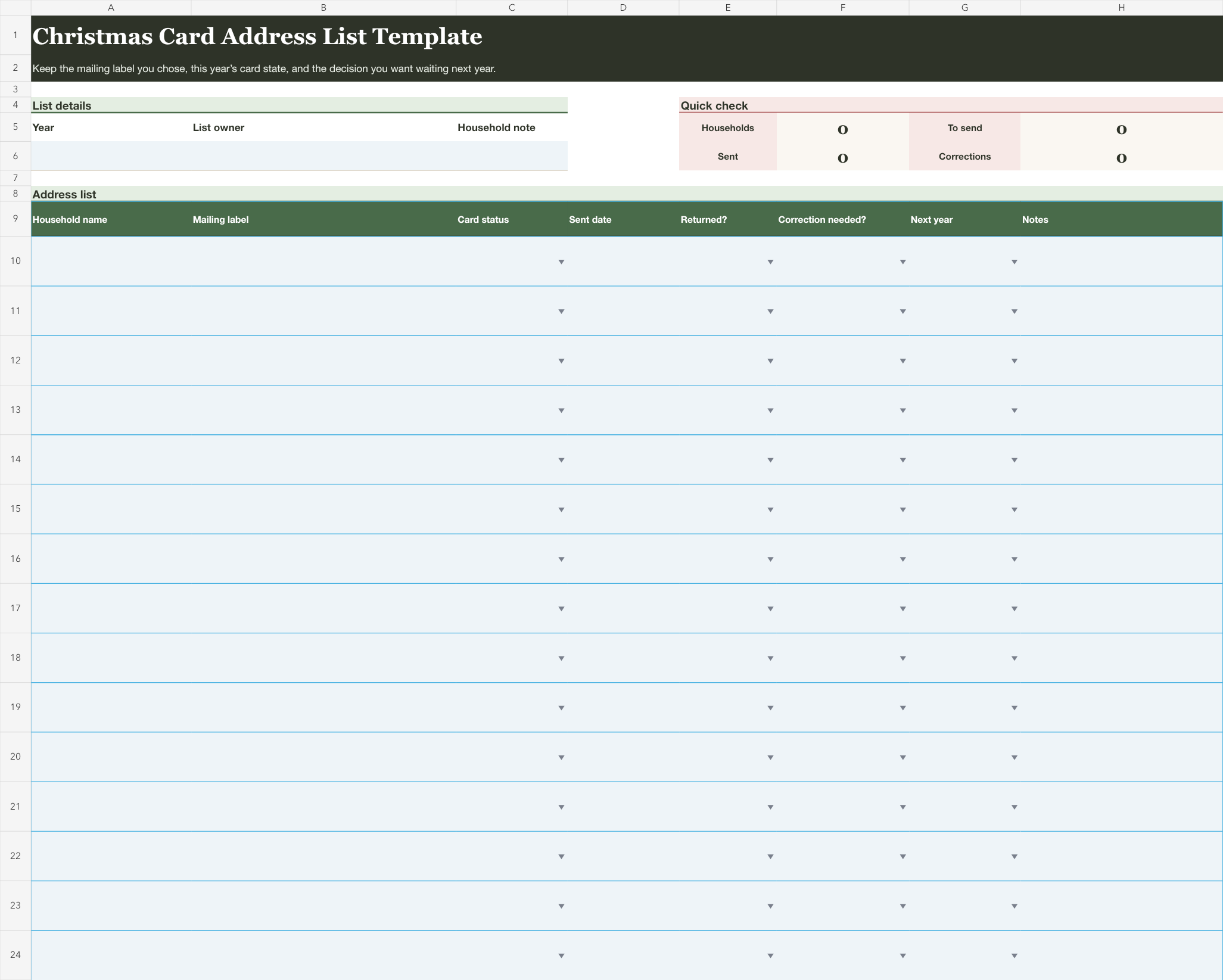
The workbook has 50 blank rows on its main sheet. The header stays visible while you scroll, and every column can be sorted or filtered. Short dropdowns keep the current state readable. The summary counts households and rows marked to send. It also counts sent dates and corrections.
A second sheet mirrors the list in a compact paper layout. Fill the main sheet, then print that view in landscape when paper is easier for the part of the season you're in. The public file contains no example names or addresses.
Start with what changed this year
If you already have a list, don't rebuild it from memory. Open the place you used this year and bring over only the households you still recognize. A handwritten page or phone note is enough. An older spreadsheet works too.
Then look at the evidence the season left behind. A returned envelope belongs with its household row. So does the new label somebody sent you, or the note that you skipped a card this year and want to reconsider next time. The workbook gives those facts a place, but it doesn't decide what any of them mean for your family.
Keep the first pass short. Add the household name and the exact mailing label you already chose. Mark Send or Skip for the current season. Leave the remaining fields blank until something happens. A blank date is easier to understand than a guessed one, and a blank note won't turn into a mystery later.
Move one row through the season
The main sheet stays easy to scan because it doesn't try to become a full address book. Each row holds the card decision for one household or recipient group as your family defines it.
| Column | What belongs there |
|---|---|
| Household name | The short name that helps your household find the row |
| Mailing label | The complete label text your household chose to keep |
| Card status | Send or Skip for this season |
| Sent date | The date you sent the card, if you want that record |
| Returned? | Yes only when a sent card came back |
| Correction needed? | Yes when your household wants to revisit the label |
| Next year | Keep, Review, or Remove |
| Notes | One short reminder that will still make sense later |
The mailing-label cell can hold more than one line, so you don't have to split the label into separate pieces. Use the wording and line breaks your household has already chosen. The template doesn't check or standardize them.
That boundary keeps the notes column from doing too much. “Moved?” is hard to interpret months later. “Use the new label from the card we received” is still a reminder, but only write it when that is the choice your household made. If the row needs a longer conversation, mark Review and keep the spreadsheet out of it until you have an answer.
You don't need to maintain every field at once. Update a row when something actually happens.
- Add Send when a household belongs in this season's group.
- Add the sent date after the card leaves your hands.
- Mark Returned? only if the card comes back.
- Set Correction needed? when you want to revisit the label before another card goes out.
- Choose the next-year state during your end-of-season pass.
The two yes-or-no columns are deliberately separate. A returned card may lead your household to review the label, but the workbook doesn't assume that outcome. A correction can also be needed for a reason that has nothing to do with a return. Record what happened and the decision you made, without asking one dropdown to explain both.
During the season, filter Card status to Send and look for blank sent dates. Afterward, filter Returned? or Correction needed? to Yes. The spreadsheet won't make a choice for you, but it makes the rows asking for one easier to find.

Use the list shape that fits your household
A small card list may need only a household name and mailing label, plus the sent date. Leave the rest blank until it becomes useful. When two adults share the card work, one can filter to Send with no sent date and continue from the current record. A short note at the top can say who is keeping this year's file if that prevents two versions from drifting apart.
For a list that includes more than one country, keep the complete label your household intends to use in the mailing-label cell. The sheet doesn't supply formatting rules or mailing instructions. Its job is to preserve your chosen text beside the card state, so the annual review still works with the information you entered.
If your family sends cards to individuals who share an address but need separate rows, use separate rows. If one household receives one card under one label, a single row may be clearer. No formula depends on a particular family structure.
Keep card addresses out of the broader Christmas plan
This workbook is intentionally separate from the Christmas gift list template. A gift list follows an item from idea through handoff. A card address has a different life. Combining both usually leaves a wide sheet where the useful states are harder to scan.
The same boundary applies to the editable Christmas planning checklist. That page is for household tasks and decisions across the season, including their dates and owners. Keep “send cards” there if it is a real household task. Keep the names and labels here, where a return or correction can survive until next year.
If seasonal lists tend to collect in one person's head, the broader mental-load guides can help you separate household decisions from the records that support them.
Make the next-year decision before closing the file
The last useful moment for this workbook comes after the cards are sent. Filter for returns and corrections, then read the next-year column from top to bottom. Keep means the row can begin next season as it stands. Review means your household wants to look at it again. Remove means it should stay out of the next list unless you make a new choice later.
Those states don't rank relationships or prescribe who should get a card. They only record what your household wants this file to show when it opens again. If five rows still need an answer, leave them marked Review instead of writing speculative notes. Next November, those five rows will be waiting together.
Once the current rows are settled, filter returns and corrections one last time. Then resolve every row marked Review and remove the rows you decided not to carry forward. Save a fresh copy for next season and change the year at the top. In that new copy, keep the household names and mailing labels. Clear Card status, Sent date, Returned?, Correction needed?, and Next year so the seasonal counts start clean. Keep only the notes that will still make sense. The old file can remain this season's record.