Free chore chart maker

Make a chore chart your kids can run themselves.

Add your kids, tap age-appropriate chores, pick the days, and print. The chart says whose job it is and when, so you do not have to keep saying it. Free, no account, nothing to install.

Make your chore chart

Which days?
Theme
Who is this chart for?
Pick each kid's chores

Tap a suggestion to add or remove it, or write your own, and keep the list short enough to finish. Chores start on every day of the chart; tap the little day dots to narrow one down.

Kid 1

Our chore chart

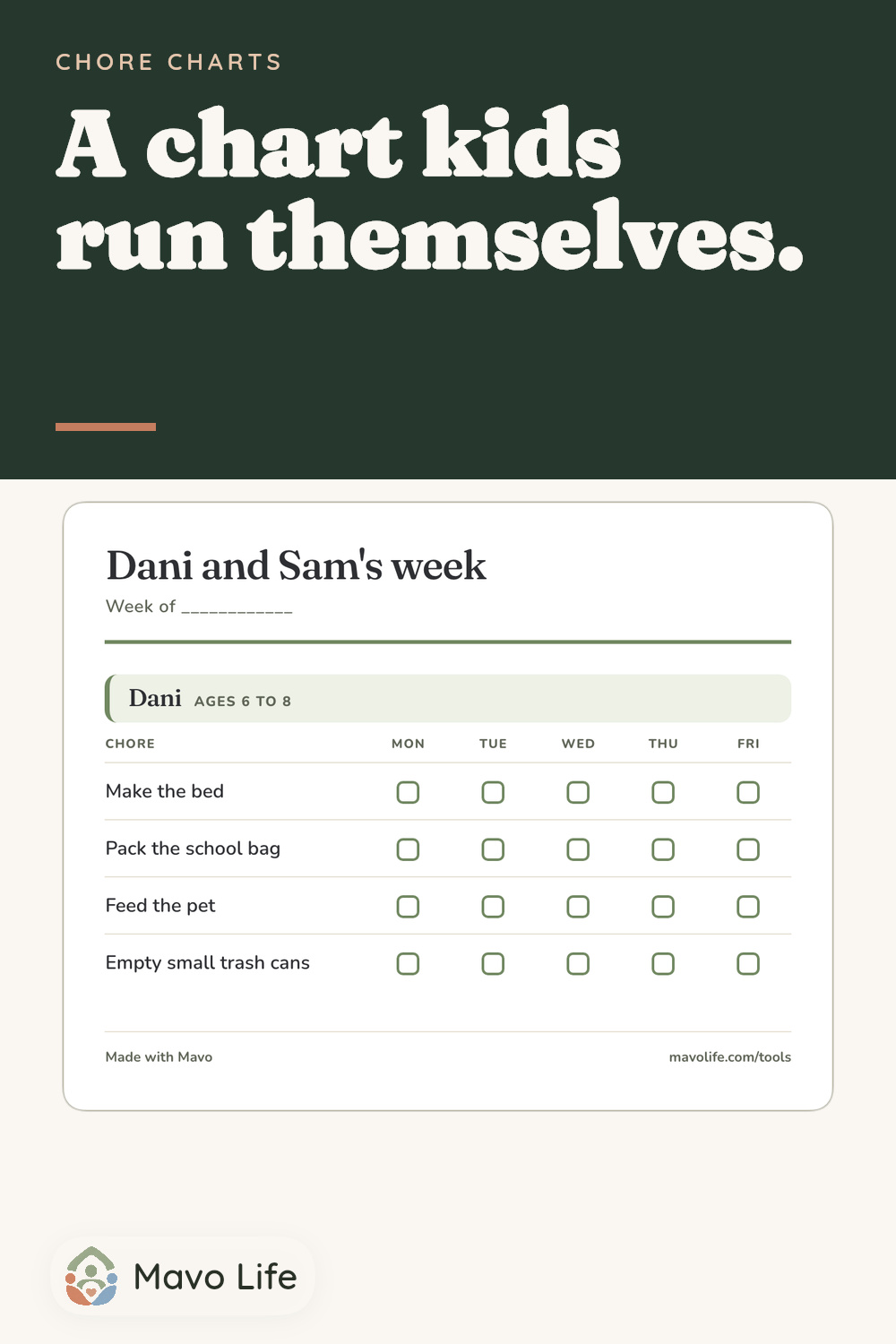
Week of ____________

Kid 1

ages 6 to 8
ChoreMonTueWedThuFri
Make the bed
Pack the school bag
Feed the pet
Empty small trash cans
Made with Mavomavolife.com/tools

After the printout

When the week changes, parents can check Mavo.

Your kids can check their boxes without a phone, an account, or another thing to charge. If trash night moves or pickup changes, parents can update the shared plan in Mavo and see who is handling it.

Parents can check schedule changes and assignments in Mavo.

Four practical steps

How to make your own chore chart

A chart works best when a kid can understand it at a glance and finish what is on it. Build the smallest version that can survive a school week.

  1. Start with the kids

    Add each kid and choose the closest age range. A five-year-old needs one-step jobs. An eleven-year-old can carry a task from start to finish.

  2. Keep the list short

    Two to four chores is plenty for a younger kid. A finished short list builds the habit faster than a crowded chart that gets ignored by Thursday.

  3. Put chores on real days

    Use school days, every day, or your own columns. Then narrow a chore such as taking out the trash to the day it actually happens.

  4. Hang it where the work happens

    Print the chart and put it at kid height. Leave the marker close enough that the kid can make the checkmark.

Start with a working setup

Custom chore chart examples you can load and edit

Pick the setup closest to your family. It loads into the free maker above, where you can change every name, chore, day, and color before printing.

Example 1

A first chart, ages 4 to 5

Three one-step jobs a preschooler can do without a parent hovering. At this age the chart is really routine practice with a checkbox.

  • Short enough to finish before the wiggles win
  • Jobs a preschooler can do start to finish
  • The same three boxes every day, so the habit sets in
Example 2

School-day chart for two kids

The classic fridge chart: Monday to Friday columns, each kid with their own jobs, and trash duty narrowed to the night the truck comes.

  • Both kids on one page, so the split stays visible
  • Trash night is Tuesday only, not a daily nag
  • Weekends stay off the chart on purpose

Example 3

Weekend jobs for a teenager

Two columns and three real jobs, with the school week left alone. Start-to-finish work suits this age better than a list of little tasks.

  • Bigger jobs a 15-year-old can own outright
  • Saturday and Sunday only
  • Room to write an allowance deal into the title

Free printable chore chart

Start with age-based chore ideas, then make the chart yours.

A blank template still leaves you deciding what belongs on it. This maker gives you a useful starting point and keeps every choice editable.

One page, one week, and a check box the kid can reach.

Built-in starting point

Chore ideas that change with age

Choose an age from 2 through the teen years and get realistic starting ideas. A preschooler can put toys in a bin. A ten-year-old can help with laundry. Tap a suggestion, edit it, or write your own.

Every kid on one page

Each kid gets a named section with their own jobs. The full family chart prints together, so the split stays visible.

The right boxes on the right days

Choose the chart days, then narrow any chore to only the days it happens. Tuesday trash night does not need seven boxes.

A clean printout with no account

Print the finished chart or copy it as text. The maker stays free, and the chart remains saved in this browser for the next edit.

For the kitchen

Give kids a place to look without giving them another app.

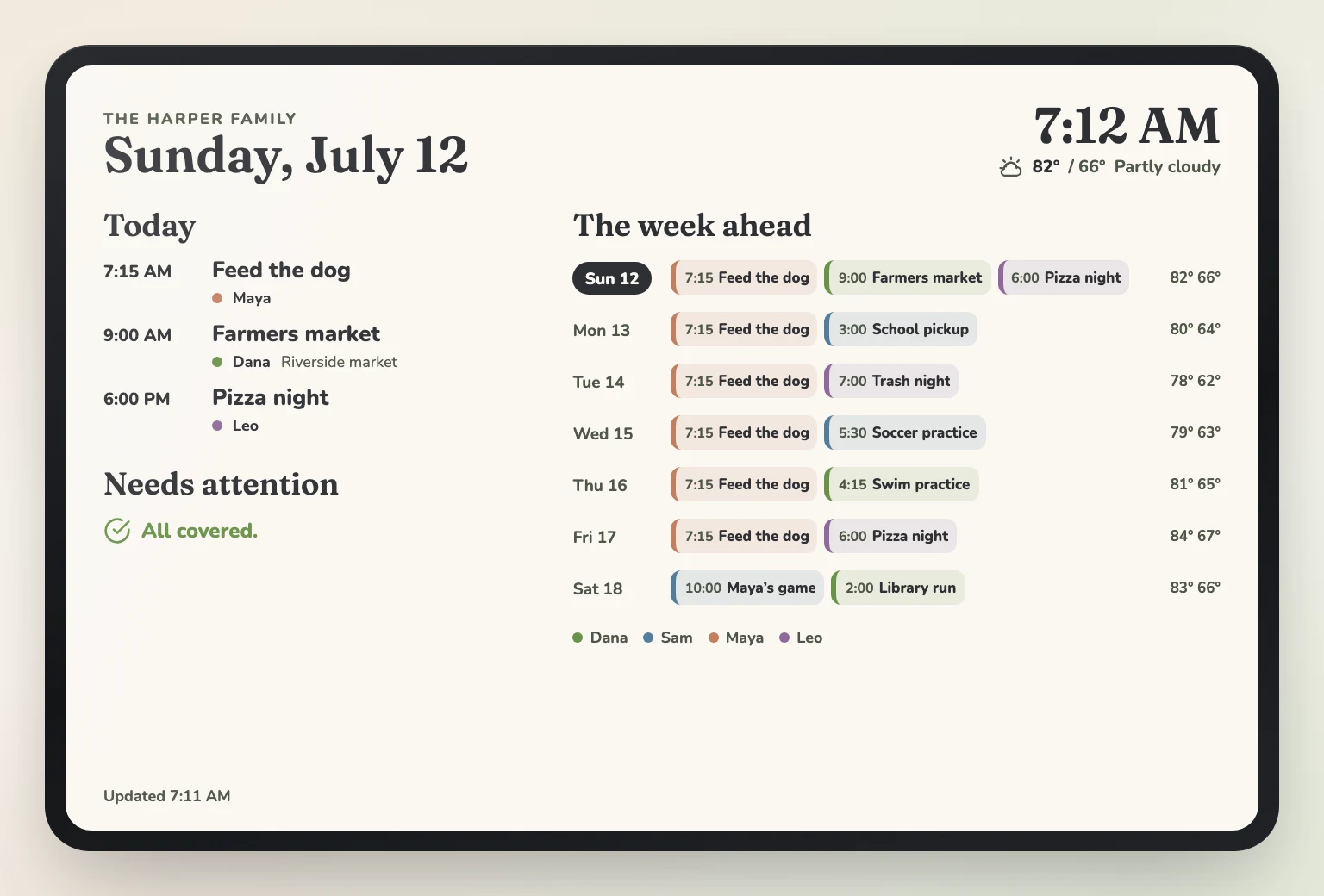
The printed chart can stay at kid height on the fridge. Open an always-on Family Display for a kitchen tablet or shared screen to show the day, the week ahead, and who is handling each item.

The Harper family display on a kitchen tablet, with today's plans, a needs-attention area, and the week ahead labeled with Dana, Sam, Maya, and Leo
Kids can read the shared screen in the kitchen. The parents keep Mavo on their own phones.

After the chart is hung

Parents can handle the changes in Mavo.

When trash night moves or pickup changes, parents can check Mavo for the new time, the reminder, and the grown-up handling it.

Morning

See the day before everyone scatters.

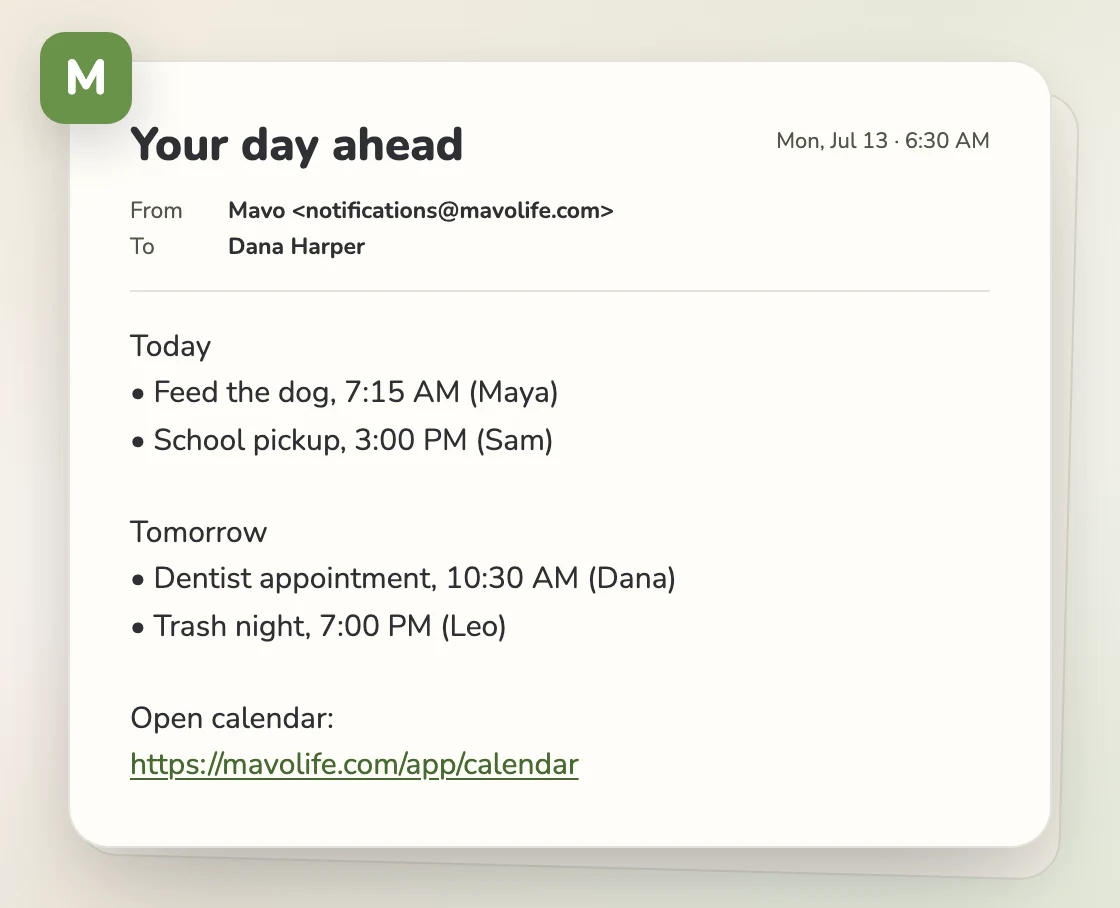
Every family can schedule Daily prep for a daily or weekly look at what is coming up and who is handling it. Daily prep can arrive in Mavo, by email, or by push.

An email from Mavo to Dana titled Your day ahead, listing the Harper family's plans with the person handling each one
Daily prep gives a parent the day or week ahead, with the owner shown beside each plan.

When it matters

Trash night can reach a parent's phone.

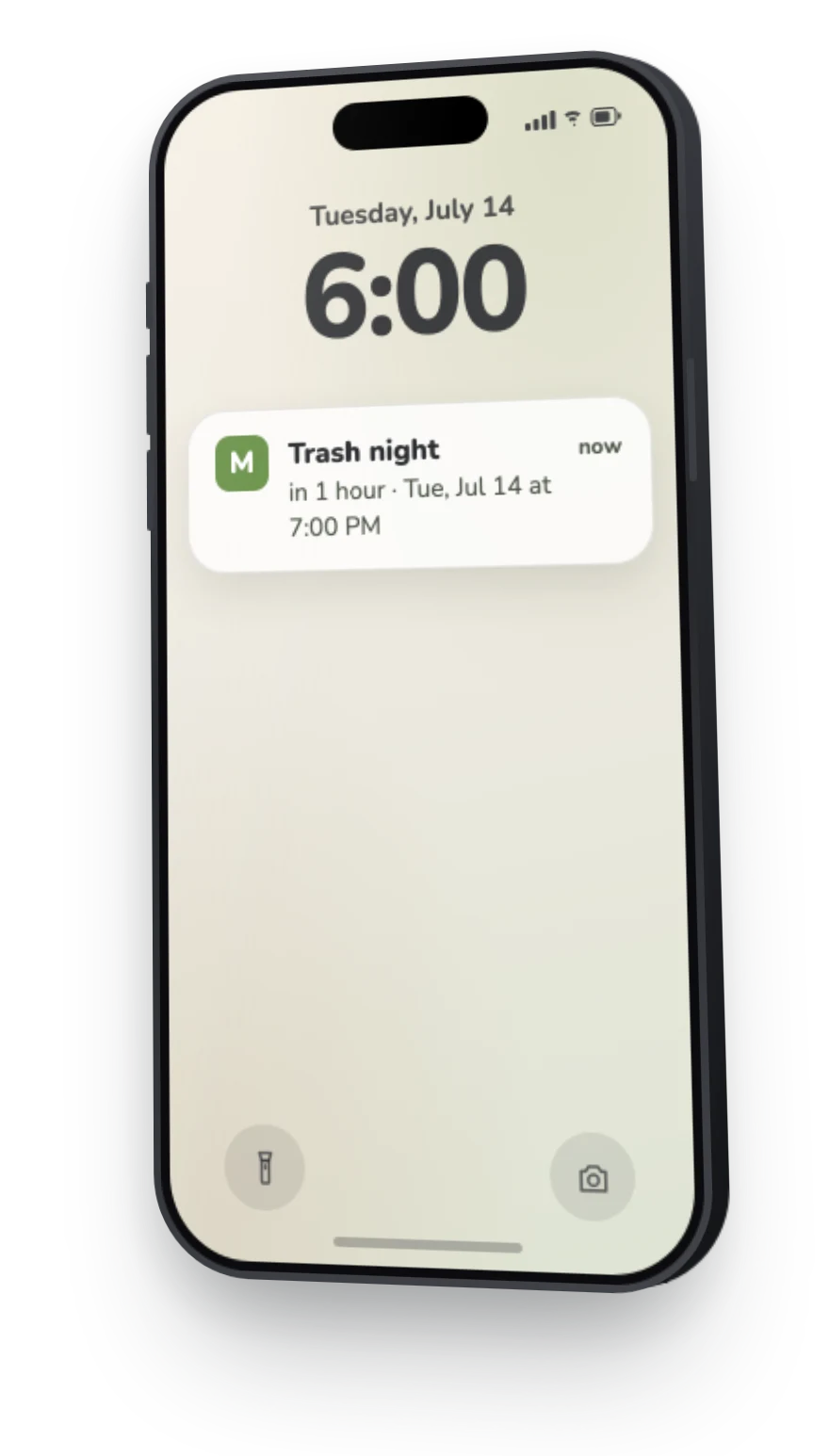
Get reminders and notifications for the things you ask Mavo to watch. The kid still checks the fridge chart. The phone reminder is there so a parent does not have to notice the clock from memory.

A Mavo reminder on a parent's phone for Trash night, due Tuesday at 7 PM
The reminder goes to a parent's phone while the kid uses the fridge chart.

During the week

Keep the routine next to the calendar.

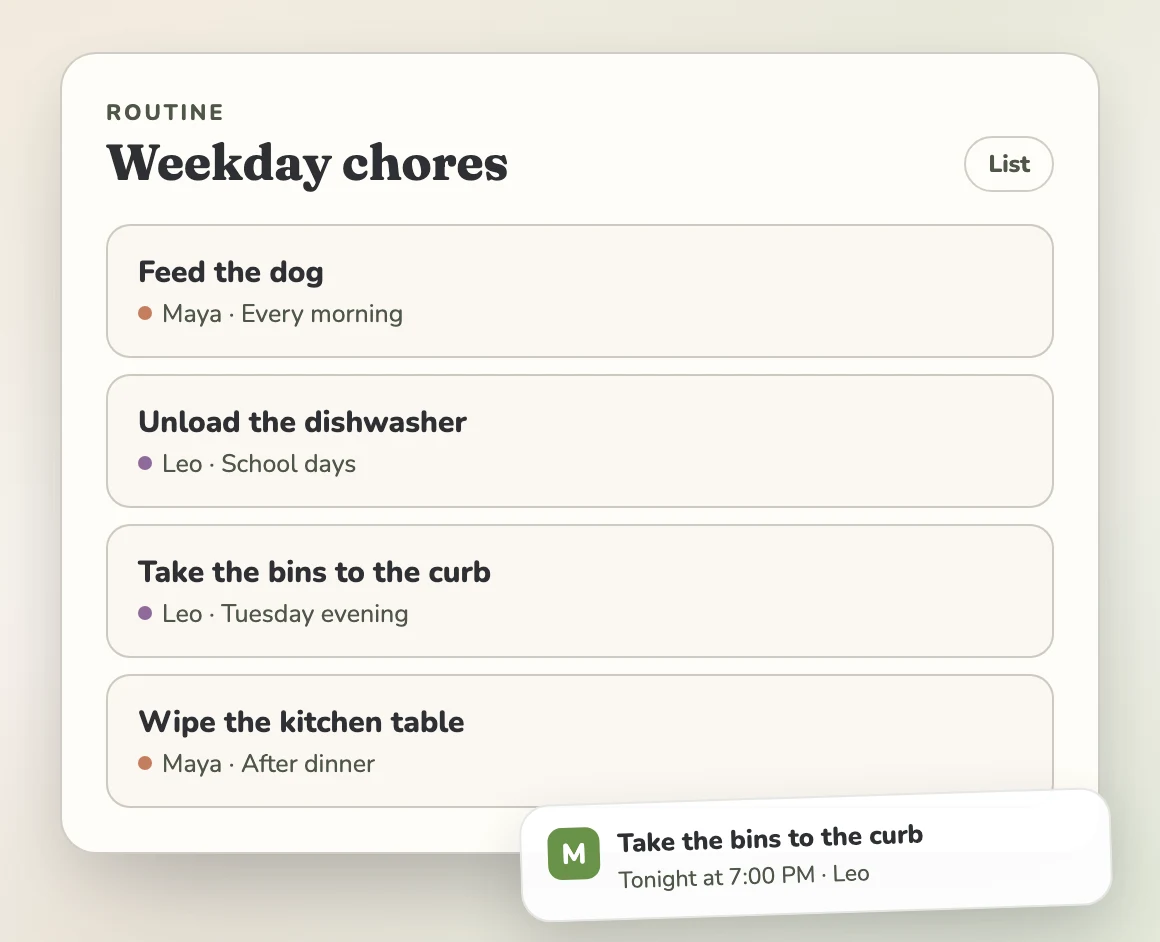
Shared routines live alongside the calendar. Assign who is handling each event or task, then see covered status and what still needs attention at a glance.

A Mavo routine called Weekday chores with rows for feeding the dog, unloading the dishwasher, and taking the bins to the curb
The shared routine stays beside the family calendar, with one person named on each row.

The usual parent pattern

Trash night can follow a standing rule.

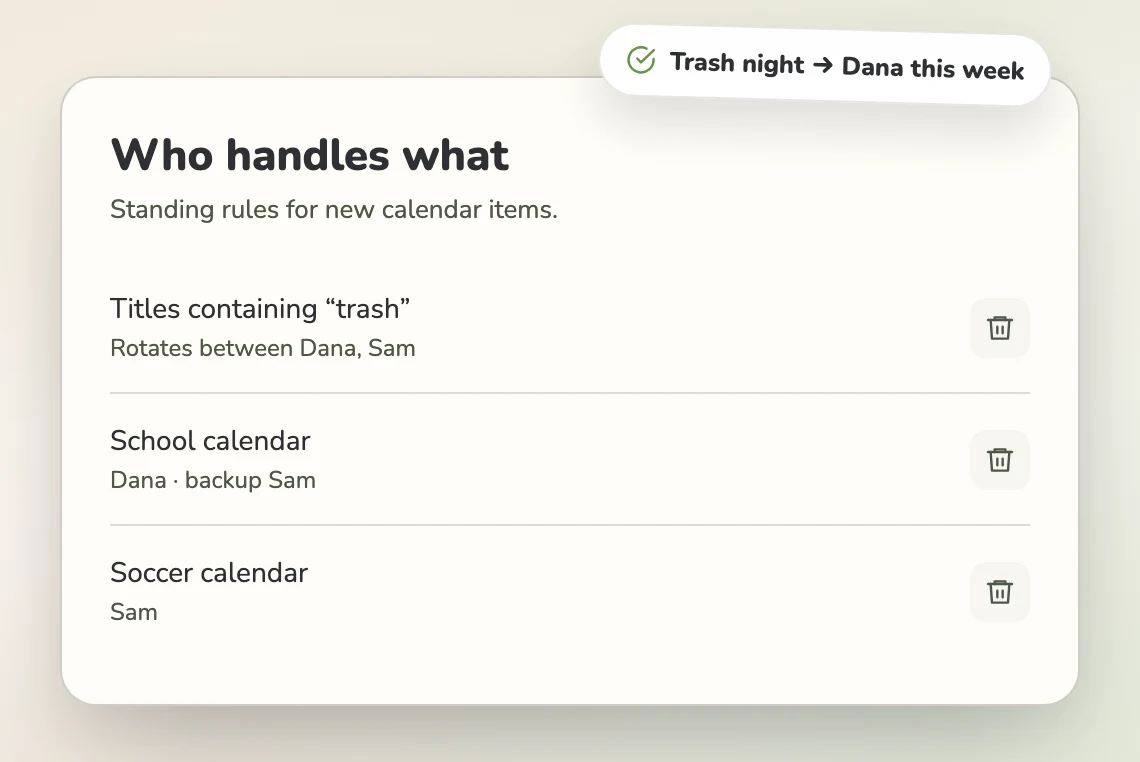
Set who usually handles events from a calendar, take turns, and choose a backup when someone passes. Use that rule for the parents while the printed chore chart stays as-is.

Mavo's Who handles what settings, with trash events rotating between Dana and Sam and school events assigned to Dana with Sam as backup
Parents can set the usual handler, take turns, or choose a backup for matching calendar items.
A Mavo routine called Weekday chores with rows for feeding the dog, unloading the dishwasher, and taking the bins to the curb
The shared routine stays beside the family calendar, with one person named on each row.

The week-two field guide

Make the chart last past week one.

Spend the first few days pointing back to the chart. These small adjustments help your kid keep using it after the novelty wears off.

Painted illustration of a boy feeding the dog in the kitchen with the family chore chart hanging on the refrigerator behind him

Use one printout for more than one week

Slip the page into a plastic sheet protector or laminate it. A dry-erase marker lets the kid wipe the boxes clean at the end of the week, and the blank Week of line keeps the same printout useful.

If your family prefers paper checkmarks, print several copies at once and pin the stack behind the current week. The saved chart in this browser makes later edits quick.

In practice

Keep the marker beside the chart. If the kid has to ask for it, the chart still depends on a parent.

Fix the chore before blaming the kid

When the same job stalls every week, look at the wording. Clean your room can become clothes in the hamper for a younger kid. A clear finish is easier to start.

Talk about the change at the weekly family meeting, not in the middle of a Wednesday argument. The chart should hold the agreement you already made.

In practice

Ask, "What does your chart say?" Then give the kid a moment to find the next box.

Let the checkmark do some of the work

Younger kids often enjoy marking the box as much as finishing the job. Let the kid make the checkmark, then name the specific thing that happened: "You fed the dog before school all week."

If chores connect to allowance, write down the family rule. Some families keep everyday family jobs unpaid and offer money for extra work. A steady rule is easier to follow than a new bedtime decision.

In practice

For a kid under eight, keep any reward close to the chore instead of promising something weeks away.

Change the chart when the kid changes

Swap a stale chore, trade an unpopular job between siblings, or move an older kid to a larger responsibility. A chart should grow with the kid instead of becoming wallpaper.

The weekly meeting is also a good time to hand over one age-appropriate item from the mental load checklist. Put only the kid's part on the printed chart.

In practice

Change one row at a time. A full reset makes the chart feel new, but it also erases the pattern the kid already learned.

Built for real family setups

Who this chore chart maker is for

Choose the chores for the kid using the chart and the week your family has ahead.

Parents of littles, ages 2 to 5

Begin with two one-step jobs, such as toys in the bin or clothes in the hamper. The chart is practice at noticing and finishing a small responsibility.

School-age siblings, ages 6 to 11

Keep everyone on one page so the split is visible. Three or four jobs each is enough, and day-specific boxes keep trash night from becoming a daily argument.

Tweens and teens

Use fewer rows with larger jobs. A full load of laundry or a simple dinner gives an older kid a clear start and finish.

Families using two homes

Print the chart twice and put one copy in each kitchen. Keep the kid's jobs consistent where that makes sense, then change the house-specific rows before printing.

Pick the right level of help

Blank template, maker, or chore chart app?

The best choice depends on what needs to stay visible after the page is printed. A marker may be enough. A shared family plan can carry the parts that change.

How does setup begin?

Blank printable template
Handwrite every name and chore.
This free chore chart maker
Add the kids, choose chores, and edit the days.
Mavo shared plan
Add a shared routine beside the family calendar.

Does it suggest chores by age?

Blank printable template
No
This free chore chart maker
Yes, from age 2 through the teen years.
Mavo shared plan
Bring the routine your family already uses.

Can one chore use a specific day?

Blank printable template
Draw or label the day by hand.
This free chore chart maker
Yes. Choose the exact chart days.
Mavo shared plan
Keep a dated item on the shared calendar.

Can a parent get a reminder?

Blank printable template
No
This free chore chart maker
No. It is a printout.
Mavo shared plan
Get reminders for the things you ask Mavo to watch.

Is there a morning view?

Blank printable template
Read the chart in the kitchen.
This free chore chart maker
Read the chart in the kitchen.
Mavo shared plan
Schedule Daily prep for a daily or weekly look at what is coming and who is handling it.

Can parents name who is handling it?

Blank printable template
Write a name.
This free chore chart maker
Give each kid a section.
Mavo shared plan
Assign who is handling each event or task and see covered status at a glance.

What can kids see without a phone?

Blank printable template
The paper copy.
This free chore chart maker
The finished custom chart.
Mavo shared plan
Use the always-on Family Display on a kitchen tablet or shared screen.

The printed chart and Mavo can work together. Keep the check boxes where the kid can reach them. Use the shared plan when the parents need a current view.

Common chore chart questions

Is this chore chart maker free?

Yes. Make as many charts as you like and print them with no account or email. Your chart stays saved in this browser, so you can come back and change it next week.

What chores are right for each age?

Around ages 2 to 3, begin with one-step pickups such as putting toys in a bin. Four- and five-year-olds can help set the table. By ages 6 to 8, many kids can own a daily job such as feeding the pet. Ages 9 to 11 can help with dishes or laundry. From 12 up, try a start-to-finish job such as cooking a simple dinner. Every suggestion in the maker is editable.

How many chores should a kid have?

Two to four is usually enough for a kid under nine. An older kid can carry more if the jobs are realistic. If the chart keeps getting ignored, shorten it until finishing feels possible.

How do I make a chore chart for multiple kids?

Add each kid to the same chart. Everyone gets their own section, and the whole chart prints on one page so the split stays visible.

How do I get my kids to use the chart?

Build it with them. Let the kid choose a job or the chart color. Hang it at their height and let them make the checkmark.

What should I do when chores do not get done?

Keep the response calm. Ask what the chart says. If the same row stalls each week, shorten the list or rewrite the chore with a clearer finish. Talk about the change at the weekly family meeting instead of during the argument.

Should kids get paid for chores?

Families make different choices. One common approach is to treat everyday family jobs as unpaid and offer allowance for extra work. Whatever you choose, write down one steady rule instead of deciding chore by chore.

Should I use a reward chart instead?

For a young kid, checking the box may be enough reward at first. If you add something extra, keep it small and close to the finished chore. Older kids often respond better to a clear privilege or allowance agreement than a sticker system.

Do I have to print a new chart every week?

No. Put the chart in a plastic sheet protector or laminate it, then use a dry-erase marker. Wipe the boxes clean when the new week starts. Reprint only when the jobs change.

Can I make a chore chart on my phone?

Yes. The maker works in a phone browser. You can print from the phone or copy the chart as text. There is nothing to install.

Is there a chore chart app for families whose kids do not have phones?

Yes. Keep this printed chart for the kids. In Mavo, shared routines live alongside the calendar, parents can get reminders for the things they ask Mavo to watch, and every family can schedule Daily prep. The always-on Family Display can sit on a kitchen tablet or shared screen.

The week after the printout

Dana and Sam can check the week in Mavo.

When trash night moves or the practice time changes, Dana and Sam can check the update and see who is handling it.

One view in the kitchen

The always-on Family Display can show the Harper family's day and week on a shared screen.

A name beside pickup and practice

Assign who is handling each event or task and see covered status at a glance. Parent handling rules can set the usual person, take turns, or choose a backup for calendar items.