The mental load · August 15, 2026 · 6 min read
Christmas To-Do List Template: Editable Excel Plan
Download a free Christmas to-do list template in Excel to track household dates, adult owners, task status, and the next decision.

A wreath can wait by the front door for three days because nobody knows whether it belongs on the porch, in the storage tote, or on next week's list. The task isn't hard. It just keeps returning to the same conversation without a date, a name, or a decision beside it.
Start with the loose work that needs a home. A shared list can help when tasks move between adults or dates. If a phone note already answers who is doing what, there's no reason to replace it.
Start with the work already asking for attention
Don't try to fill every row. Write down the handful of tasks that keep resurfacing in conversation, on notes, or in a text thread. A task can be as plain as "confirm who sets up the guest room" or "decide whether the porch lights stay up this year." Another adult should be able to read the line and know what happens next without asking for the backstory again.
Leave out gifts, card addresses, menus, and spending details if they have their own home already. Keeping separate records is not fussy. It stops one broad Christmas document from becoming the place where every half-made decision goes to hide. For recipient and gift progress, use the Christmas gift list template instead. For mailing labels, returns, and next-year choices, use the Christmas card address list template. If the problem is the broader work a household keeps carrying, the mental load checklist is the better companion page.
Download the editable Christmas household plan
Download the Christmas to-do list template (Excel)


The workbook has three tabs:
- Start Here holds the few decisions your household has already made and anything you are willing to move or skip.
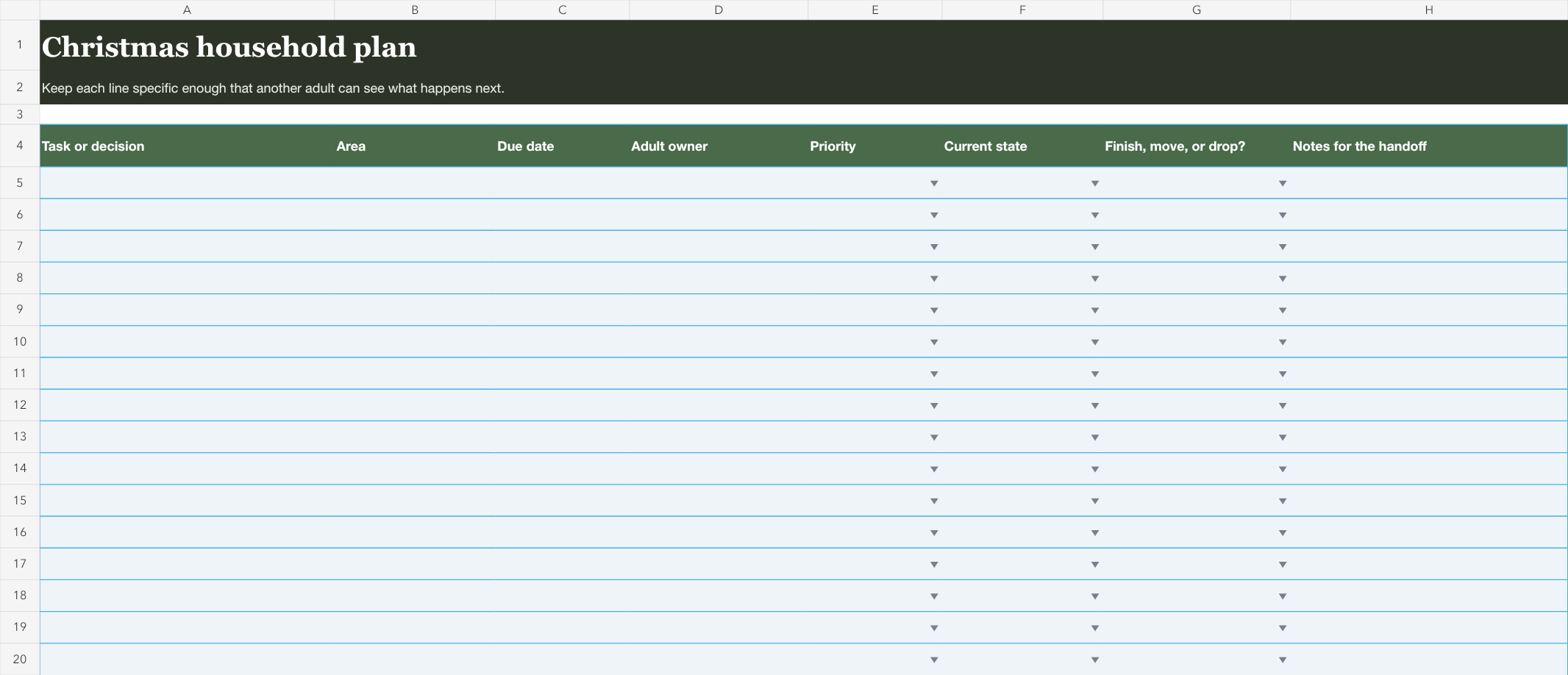
- Christmas Plan is the editable shared list, with 40 task rows, dropdowns for priority and status, and filters for finding the loose ends.
- This Week is an optional short view for the tasks you want to talk through together. It does not replace the full list.
The file starts blank on purpose. A list of somebody else's holiday traditions can be a useful prompt, but it can't know which work belongs to your household this year. If you want a printable Christmas to-do list, print a filled view after you decide what belongs on it. The editable Excel version is for the part that changes before then.
Here is what each planning column is for:
| Field | Add this | It helps you avoid |
|---|---|---|
| Task or decision | A specific household action or question | A vague category that nobody can complete |
| Due date | The date your household wants to revisit it | A task drifting behind newer reminders |
| Adult owner | The person carrying the next move | "I thought you had it" |
| Priority | Must do or optional | Treating every task like an emergency |
| Current state | Not started, waiting, in progress, or done | Reopening work that is already settled |
| Finish, move, or drop? | The honest next outcome | An old task staying on the list by default |
The priority and next-decision fields stay deliberately small. They help a household separate the few things that keep the plan working from the things that sounded nice when there was more time.
Try a four-row holiday triage
You don't need a finished December plan to test the workbook. Add four current tasks, give each one a different state, and see whether the next move is obvious. These are examples, not a required Christmas checklist:
| Task | Adult owner | Current state | Next decision |
|---|---|---|---|
| Confirm guest-room setup | Jordan | Waiting | Ask whether the room is needed this year |
| Sort the porch-light tote | Casey | In progress | Finish by the household's chosen date |
| Pick up the storage hooks | Jordan | Not started | Move it if the date stops working |
| Set aside the extra decorations | Casey | Done | Drop the reminder |
The point isn't that these four tasks belong on every list. It's that each one tells a different truth. The waiting row needs an answer. The in-progress row has a finish line. The first row can move without changing who owns it. The done row can leave the weekly conversation.
When a row is waiting, write the next bit of context the owner needs, such as "confirm the date" or "decide whether this stays on the list." When the answer comes, update one field and let the task become ordinary work again. That's enough structure to keep a small decision from turning into a message hunt.
Give the list a real end for this week
You don't have to solve the whole season in one sitting. Start with the next week or the next household check-in, then return to the file when a date changes or an answer arrives. You'll get more from five current rows than from forty guesses about what might happen later. That doesn't need a bigger system.
When you reopen it, begin with Waiting and the earliest due dates. Those are the lines most likely to need a conversation. If an optional task keeps moving without a clear reason to keep it, it's okay to drop it. Watching a line disappear after the decision is made is one of the few satisfying parts of a seasonal list. It means nobody has to keep defending a task that no longer belongs.
Sometimes a task will outgrow the worksheet because it has a time, place, and a person who needs to handle it. That doesn't make the spreadsheet wrong. It tells you the task now needs a calendar event or a direct handoff, while the rest of the household work can stay in the smaller list.
If you use Mavo, keep ordinary household tasks in a shared list. When a task has a date and needs an adult to handle it, add it to the shared family calendar as an event and assign an owner. Mavo can then show its covered status and what still needs attention. The download remains free and useful without an account.
Use the weekly tab only when it makes the conversation shorter
The This Week tab is for a quick handoff, not for copying the whole plan. Pull over the handful of tasks that have a date, an owner, or a decision to make. If there isn't anything worth discussing, leave it empty. You won't get more organized by recreating the full spreadsheet in miniature.
If your household already has a phone note that both adults check, that may be all you need. Use the workbook when the plan changes across several people or dates and the note has stopped answering who is doing what. If you're looking for a broader ritual around a short household check-in, the weekly family meeting agenda can help keep the conversation contained. If it isn't helping, leave it out.
A holiday planning checklist should have a finish line
This holiday planning checklist is a place to decide which work stays yours. Open the file and add the one task that is still bouncing between people. Give it a date or a next decision, then let that line carry the reminder for you.
That's enough for today.