The mental load · August 11, 2026 · 7 min read
Free Christmas Gift List Template: Spreadsheet and Printable
Download a free Christmas gift list template to track recipients, gift ideas, a family-set limit, ordering, arrival, wrapping, and handoff.

Gift lists usually don't disappear. They split. One name sits in a text thread. An idea is parked in a browser tab, while the wrapping step lives in somebody's head. By the time the holiday gets close, it's hard to tell whether a gift is still only an idea or is actually ready to give.
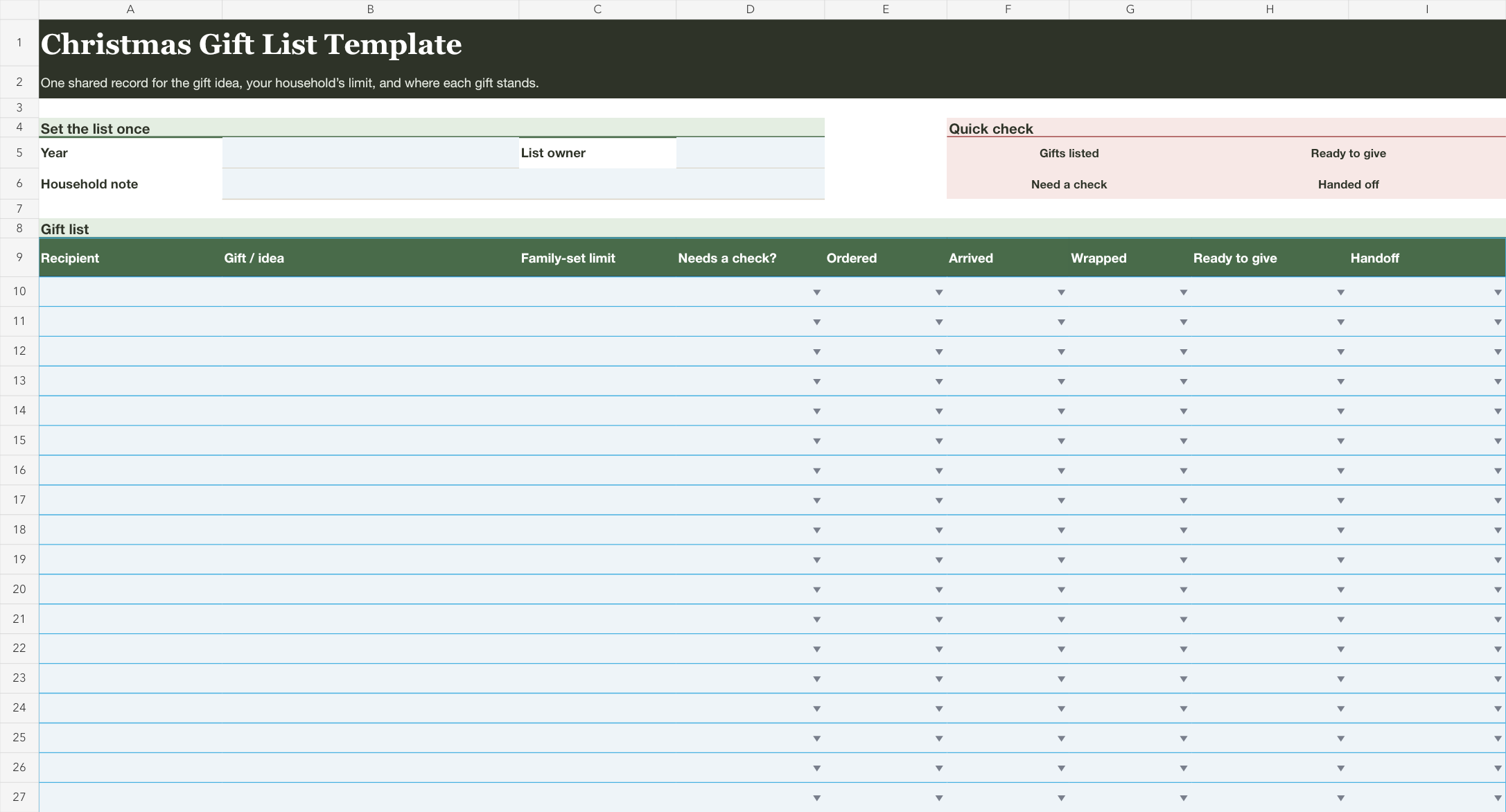
This free Christmas gift list template puts the life of each gift on one line. It comes as an editable spreadsheet for the weeks when details move around, plus a one-page printable for the family counter. Write the recipient and the real gift idea. Add a limit your household already chose, then mark the steps that are finished. Gift suggestions and spending plans aren't included. The same goes for private inventory. Your own decisions have somewhere visible to land.
Find the line that has stopped moving
Before you fill the whole list, look for one gift that has stalled. Maybe it arrived and is still sitting in its mailer. Maybe the exchange limit changed after you wrote the first idea down. Maybe your partner saw the gift plan last Sunday, but you can't remember whether they took the next step. Those aren't dramatic problems. They're the small loose ends that make the list feel unreliable.
Write that line first. You'll see what the template is for when the idea sits beside the household limit and the unfinished step. It doesn't need more detail than that. You won't fix every December task here, but you can stop one gift from turning into a question that comes back at bedtime.
Download the free Christmas gift list template
Download the Christmas gift list template (Excel)
Download the printable Christmas gift list (PDF)
The spreadsheet is for a list you'll reopen. Add one gift per row, then use the short status fields as the work changes. The printable is for one sitting. Write the names and ideas, keep it somewhere shared, then check each box only after the real step is complete.


Give each gift a complete little story
Start with the people you are actually planning for. Then record the gift idea that is real enough to act on. A line like “Dad, maybe something for the grill” is a note for later. A line like “Dad, the cookbook he pointed out” is a gift you can check on. Leave out links and store names. Write the version of the idea your household already recognizes.
If your household has agreed on a limit for that person or exchange, write that number in the template. It is your number, not a recommendation from this page. Some families use a different limit for each person. Some use one agreed exchange amount. Some leave the column empty because it isn't part of their plan. The list works either way.
| Column | What belongs there | What it avoids |
|---|---|---|
| Recipient | Person or exchange | A vague “gifts” task that nobody can finish |
| Gift / idea | The specific thing you have in mind | Searching old messages to remember what was decided |
| Family-set limit | A limit your household already chose | Re-opening the same decision with every item |
| Needs a check? | A clear yes only when something is unresolved | Treating a vague concern as invisible |
Leave a row blank when the recipient or idea is still unknown. A blank row is more honest than a placeholder that looks settled but needs another conversation. You don't have to finish every line in the first sitting. The useful first pass is the one that shows which names are still floating around the edges.
Use the status fields when the object changes state
The spreadsheet moves a gift through four physical states: Ordered. Arrived. Wrapped. Ready to give. “Ready to give” means the gift itself has reached the point where your household considers that line complete. It may still be waiting for the exchange, and you don't need to record where it is kept.
The printable has Handed off instead. That box is about the list, not the gift. Check it once the next person has seen what remains for that line. They might buy the gift. They might wrap it, or keep the note with the rest of the list. Keeping those two ideas separate is useful: an item can be ready to give while the list still needs to reach the person who will bring it to the exchange.
That makes the list useful on a busy evening. Open the spreadsheet and look only for gifts that arrived but aren't wrapped. Or scan the printable for empty boxes while the tape and scissors are already on the counter. The list is a record of progress, not a test of whether a household has done Christmas the right way.
Let an unfinished row say one useful thing
“Needs a check?” is intentionally narrower than a general notes column. Use it when one real question keeps a row from moving. Maybe the gift idea needs confirmation. An exchange limit may not be settled, or another adult may need to see the line. A plain Yes tells you to have that conversation. The template stays small enough to use the next time you open it.
Here's a quick way to keep that field from getting noisy:
- Leave it No when the next step is obvious and you simply haven't done it yet.
- Mark Yes when somebody needs to answer something before the line can move.
- Clear it as soon as the answer is known, even if the gift is still unwrapped.
That's enough structure to find the actual loose threads without making a list of twenty little errands. If you want a broader place to name the household work that keeps returning, the mental load checklist is a better starting point. This page stays with the finite job of getting a Christmas gift from idea to ready.
Choose a realistic list shape
One child and a partner can fit on the printable with room to breathe. A larger family usually belongs in the spreadsheet. The same is true for a group exchange or several gifts for one person. You can add another printable page, but don't shrink the writing space until nobody can read it from across the kitchen.
For a household with two homes, make the recipient field specific enough that the line is still clear after a handoff. “Avery, other-home exchange” is more useful than “Avery gift.” Then use the printable's last note for the next check, not for a history of every message. The list should save a follow-up, not become another inbox.
If you are planning a simple gift exchange with grandparents, friends, or cousins, one recipient row can name the exchange rather than every individual. That keeps the sheet honest about what you are responsible for. It also means the rest of the household doesn't have to decode who “Secret Santa” was meant to cover three weeks later.
Keep the list in the place people already look
Use the spreadsheet when the list will change as orders arrive and people share the work. Its dropdowns make the progress fields quick to update. The count boxes separate open checks and handoffs from the total gift lines. Another box shows gifts ready to give. The file starts blank, so it can match the number of people and gifts that are real for your household.
Use the printable when you want a short, visible snapshot. Fill it out at the counter. Put it where both adults will see it, then reset it for the next season. It has room for ten gift rows because a sheet needs a finish line. Add another copy when your list is longer instead of shrinking the handwriting space. A gift list under a grocery magnet is allowed to be humble. It just has to be readable when someone asks, “Did that one arrive?”
If you use Mavo, a shared list can hold the particular exchange detail or follow-up your family wants beside the rest of the plan. The spreadsheet and printable still work without an account. For a bigger December view, the weekly family meeting agenda can hold the date-sensitive decisions around the list. You won't need a perfect system for this. One gift line can stay useful without being rediscovered from scratch.
For the household work that is not about gifts, use the editable Christmas household plan to name the adult carrying the next step and track the next decision without mixing the two jobs together.