Home systems · August 24, 2026 · 7 min read
Zone cleaning list: map your home in four weeks
Build a zone cleaning list for your own rooms, then rotate one zone each week with a free editable workbook for tasks, owners, cadence, and progress.

A useful zone cleaning list begins with the rooms in your home, not somebody else's master checklist. Write down each room or area. Add only the tasks your household already wants to repeat, then group those rows into four zones. Give one zone the week's attention while the other three wait their turn.
The result is a map plus a rotation. You don't have to remember which overlooked job belongs to which room, and you don't have to fit the whole house into one weekend.
Download the editable zone cleaning list
Download the editable zone cleaning list (Excel workbook)
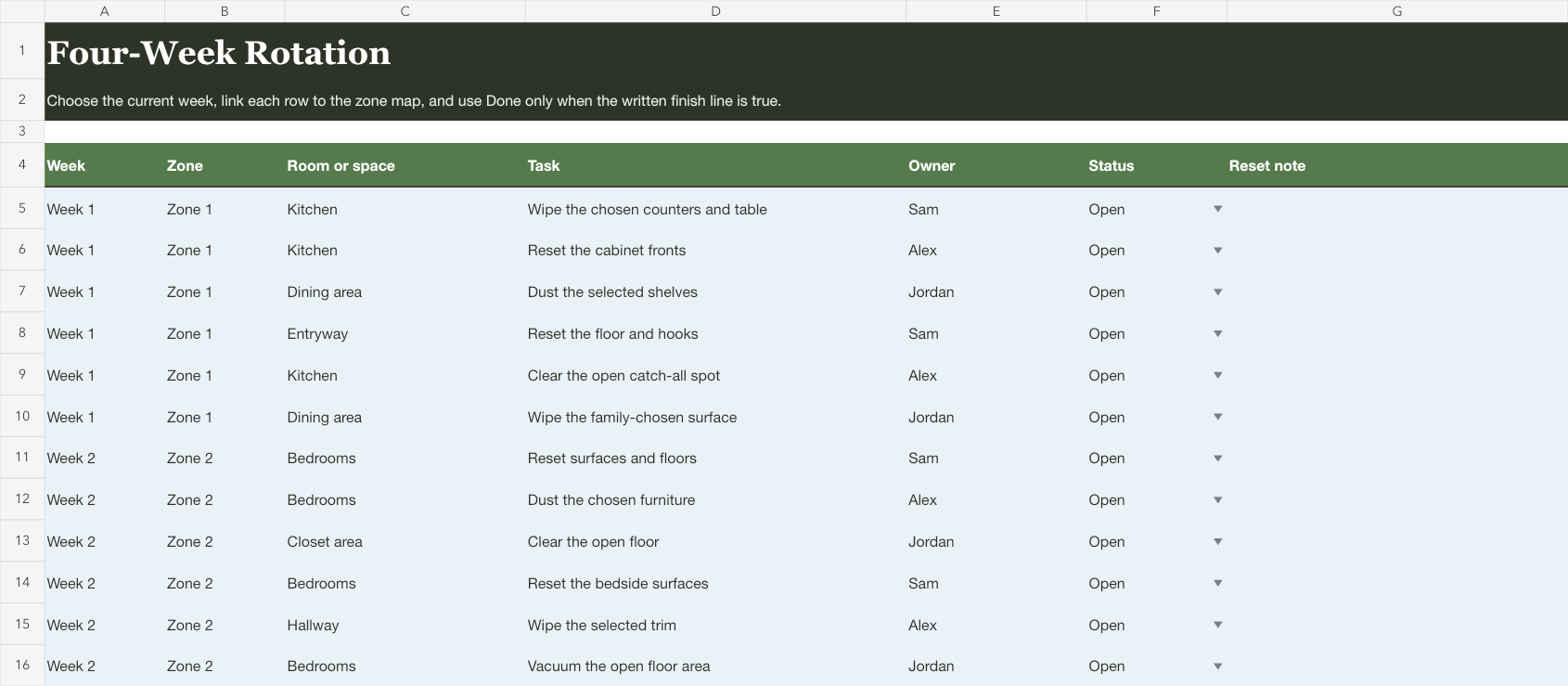
The workbook has two views. Zone Map stores the durable room list and the family's task wording. It also holds owners, cadence, and finish notes. Four-Week Rotation gives each zone its own six-row week with a current state.
Start with six to twelve rows, even if the workbook has room for more. A short list you can revise will teach you more about the home's real rhythm than fifty copied tasks.
This workbook organizes work your household has already chosen. It doesn't tell you which methods or products to use, set a cleanliness standard, or assign a task based on someone's age or ability.
Name zones from the way your home is arranged
Walk through the home in the order that makes sense to you. Write room names in the Zone Map before you add any tasks. An apartment might have an entry and one shared room beside its kitchen, bathroom, and bedroom. A larger home may split bedrooms across two zones or pair a small laundry area with the kitchen.
Four zones don't need four equal room counts. They need four groups that feel roughly possible within the time your household expects to give them. A kitchen with several rows may stand alone while three low-effort areas share another week.
Here is an illustrative map. The names and tasks are examples, not a recommended cleaning standard.
| Zone | Room or area | Household-entered task | Owner | Cadence | Week |
|---|---|---|---|---|---|
| Kitchen | Pantry | Wipe the shelf we use for lunch bags | Alex | Every rotation | 1 |
| Sleeping rooms | Main bedroom | Vacuum the open floor area | Sam | Every other rotation | 2 |
| Bathroom and laundry | Laundry nook | Wipe the outside of the machines | Alex | Every rotation | 3 |
| Shared rooms | Living room | Dust the low bookcase | Sam | Every rotation | 4 |
Notice that the map names the household's own landmarks. The shelf we use for lunch bags is easier to recognize than a generic clean pantry row. The clearer phrase also makes it easier for another person to finish without asking which shelf the list meant.
Add tasks without building an encyclopedia
For each room, write one task that doesn't already happen reliably in the ordinary week. If a room needs three, give each task its own row so owners and cadence can differ. Skip the jobs that your household doesn't want in this rotation.
Keep task language observable. Vacuum the open floor area gives the row an end. Deep clean bedroom hides several decisions inside two words. When a task turns out to contain a second task, split it during the next reset instead of writing a paragraph in one cell.
The internet's longest checklist can make an empty row look like a failure. It isn't. A blank row only means your home hasn't assigned work there. Your list can stay short.
Keep this planner away from work that needs specialized judgment. Don't use it for chemical or sanitation instructions. Mold, pests, electrical work, ladders, biohazards, and health-related decisions also stay outside this sheet. The workbook schedules familiar household tasks; it doesn't explain how to perform them.
For one larger clean, the deep-cleaning checklist supplies editable room-by-room task lists in Letter and A4. Choose the rooms for this clean; this zone workbook remains the place for recurring tasks and a four-week rotation.
Balance the four-week rotation
Assign each row to one of the four weeks. Balance by the work you wrote, not by square footage or the number of rooms. A small bathroom might contain more rows than a large guest room. A shared area may need two owners while another room has one person who already handles it.
Read one week as a group. If it feels crowded, move a row to a lighter week. Use the cadence column to record which rows return every cycle. Mark the others for every second cycle or for use only when the household chooses them. Before starting again, remove anything that isn't due.
The rotation is also different from a daily cleaning plan. It doesn't set a weekly minimum or decide what happens after a busy Tuesday. For that job, use the realistic cleaning schedule for working parents, which gives each missed task an explicit drop-or-move choice.
Give the row an owner and a visible finish
Write one name in the owner column while the task is being added. Add more than one only when those people have actually agreed to share the same row. Everyone often leaves the first person who notices the work responsible for organizing it again.
The done state belongs to the current four-week view, not the durable map. Marking a row done says it happened in this rotation. It doesn't erase the task or judge the room. When Week 1 returns, its recurring rows are available again.
That separation prevents a familiar spreadsheet oddity: a permanent task list covered in checkmarks from three months ago. The Zone Map says what can recur. The Four-Week Rotation says what happened this time.

Let an untouched row change the next rotation
An untouched row is feedback about the map. The wording may hide several jobs. Its cadence may be too frequent, or the named owner may never have agreed to it.
Change the field that made the row unrealistic before the next cycle begins. If the low bookcase moves to another room, edit its room and zone once. If nobody can recognize what dust shelves means, name the selected shelves. If the task doesn't belong in every rotation, change its cadence and omit it from the next one.
Adjust the map for the home you have
In a small home, use three zones and leave Week 4 as a catch-up or no-zone week. The workbook doesn't require every week to hold work.
For two homes, keep separate zone maps unless the same people truly maintain both places. A shared row such as return sports bag to the other house belongs in a handoff plan, not inside a cleaning task list.
When one room is handled independently, put that person's name on its rows and let them choose the wording with you. For a child's short, visible room reset, the kids cleaning checklist is the better artifact because it uses familiar destinations and picture cues rather than a whole-home rotation.
If the work is really about deciding what belongings should stay, move that project to the decluttering calendar. Cleaning rotation and decluttering can touch the same room, but they answer different questions. One repeats familiar care for the space. The other decides what still belongs there.
Put the current zone where the family will see it
The workbook can be enough. Open it at the beginning of the week, filter to the current zone, and leave it in the shared folder your household already uses. If a phone note is faster for six rows and one owner, use the note. The file earns its place when the durable map, owner changes, and sorting save repeated setup.
If your household uses Mavo, add one repeating event to the shared family calendar for the current zone. Give it an owner, or assign two people when they are genuinely sharing it. Mavo can show who is handling the event and whether it is covered. Keep the room-and-task detail in the workbook; Mavo doesn't import this sheet or decide the tasks.
At the end of Week 4, clear the current done states and edit only what the last rotation taught you. A room changed names. A row needs a smaller finish. An owner changed. The map gets better one ordinary correction at a time.
For more small home projects with a visible finish, browse the home reset guides.