Hosting & celebrations · August 10, 2026 · 5 min read
Free Party Guest List Template: Track RSVPs and Headcount
Use this free party guest list template to track invitations, RSVPs, household counts, and one follow-up in a simple workbook.

The first reply feels like a finish. Someone says they can come and you put a check beside a name. The list starts to look settled. Then another household answers through someone else. A third has not seen the invitation. The first check no longer tells you what it seemed to tell you.
That's when a plain name list stops being enough. You don't need a full event plan to repair it. You need a quick way to see who is still waiting. You also need to know what a yes adds to the room and whether there's one next reply you don't want to forget. This free party guest list template keeps that small bit of work clear for any gathering with an uncertain final headcount.
Download the free party guest list template
The workbook has two tabs. Start Here holds the party name and dates, then shows a live summary. It counts invited households and answers. It also shows attendance and follow-ups. Guest Tracker is the working tab. Add one person or one household per row, then update the answer as it arrives.
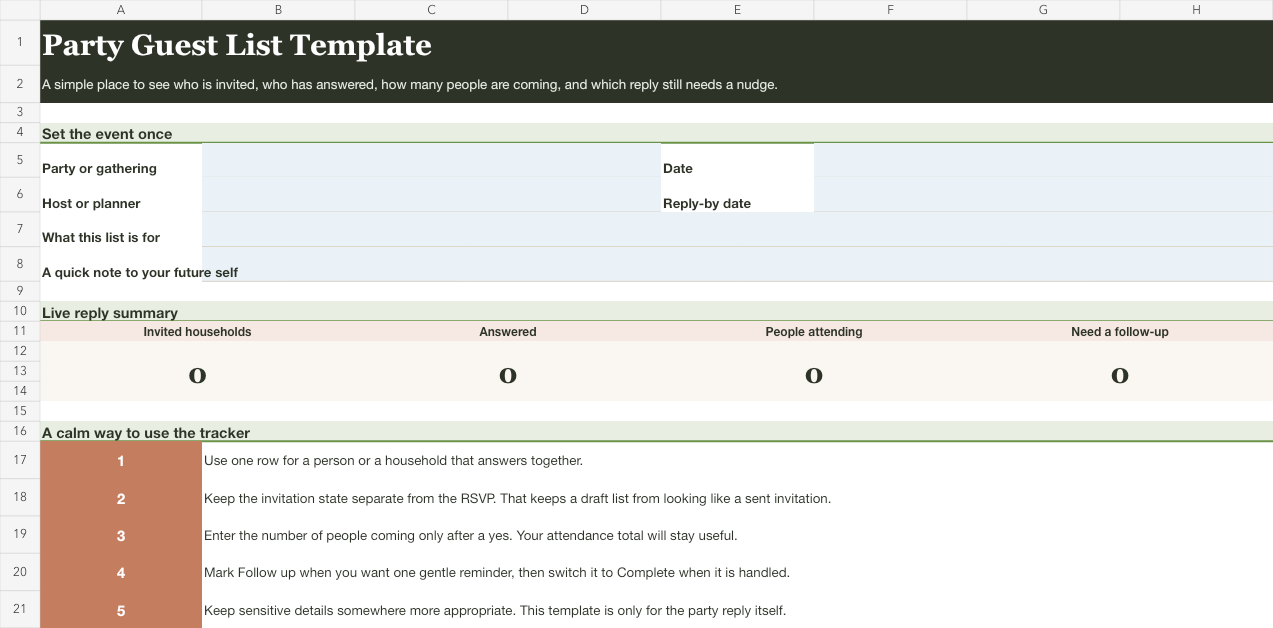
Download the party guest list template (Excel workbook)
Open it in Excel or upload it to Google Sheets. The dropdowns are already set up, and the summary updates from the rows you enter. Start with the smallest version of the list you can name clearly. You'll always be able to add a row. It's much harder to untangle a reply when two households have been made into one vague entry.


Give each reply its own job
The template keeps these four facts from getting blended together:
- People invited is the number you expect in that row. A household of four and one individual do not create the same possible headcount.
- Invitation state shows whether the invitation has been sent. This keeps a draft list from pretending that every name has already been contacted.
- RSVP records whether the reply is open, yes, or no.
- People attending is the final number that belongs in the headcount. It can stay at zero until a yes arrives.
That separation helps when an answer changes. A household can remain invited while its RSVP moves from no reply to yes, or from yes to no. The guest list doesn't need a new system for either change. Update the one fact that changed, and the summary tells the current story.
Use one row for people who answer together
Most gathering lists are easier to read when one row represents a group that will give you one answer. A row might say “Maya household” with four people invited, or it might say “Jordan” with one person invited. The right choice is the one that makes the answer and the count honest.
If two adults in the same household will reply separately, give them separate rows. If a grandparent and child are arriving together but need different responses, give them separate rows as well. The template doesn't ask you to force every relationship into a household. It gives you a home for a shared response when one makes sense.
The practical benefit is that you can scan the sheet without doing arithmetic in your head. A yes next to “Maya household” isn't enough if the table needs three seats, while a yes next to “Jordan” means one. The attendance total only becomes useful when the row matches the answer you received.
Keep follow-up small and visible
The Follow-up column has just three choices. Pick None when no action is needed. Use Follow up when you want a reminder. Switch it to Complete when the conversation is finished. That is enough for the moment when you notice a missing answer without turning the guest list into a list of messages.
Use Follow up for the handful of replies you intend to revisit. Once that message has been sent or the conversation is finished, switch it to Complete. You don't need a polished outreach sequence in a party tracker. You need the next reply you're waiting on to stay visible when you open the list.
The live summary counts those rows for you. If the number is three, there are three decisions still asking for your attention. If it is zero, the list may still have no replies, but you've chosen not to carry any next action from this sheet.
Keep the tracker focused on the gathering
The most useful party guest list is rarely the most detailed one. This workbook stays with the information that changes the invitation and headcount. It includes the name for a row, an invited count, the current answer, a date, and a short note when you need one.
Keep anything more personal in the place you already use for it, rather than collecting it in a simple party spreadsheet because there happens to be an empty column. That choice makes the list easier to share with a co-host. It also stays quick to scan close to the event and simple to clear when the gathering is over.
When this is a birthday party guest list
For a birthday party, this template handles the reply side of the plan. It doesn't decide the wider birthday plan. If those pieces need a home too, use the first birthday party planning checklist, which is made for a full first-birthday plan.
That boundary is useful even for a larger birthday. Keep the RSVP tracker open while invitations are moving. Once the people count is settled, carry only the final number into the plan that owns the rest of the gathering. The two tools can work beside one another without making the guest list do every job.
Let the final answer be ordinary
When the list is complete, the best outcome may be pleasantly unremarkable. You know how many people are coming. You know which households have declined. You can also see whether anyone still needs an answer. Export or print the final view only if that'll help the people hosting with you. Otherwise, leave the workbook as the current source until the gathering passes.
When the gathering is a backyard cookout, carry the current headcount into the editable BBQ checklist to coordinate the menu you chose, serving setup, and cleanup owners.
For a gathering where everyone brings a dish, these potluck themes with invitation wording can help you choose what to put in the invitation.
For more practical guides for having people over, browse the family hosting collection.