Hosting & celebrations · August 26, 2026 · 5 min read
BBQ checklist: one editable plan for the whole cookout
Use a practical BBQ checklist for guests, your chosen menu, serving supplies, setup, assignments, and cleanup. Includes a free editable workbook.

The easiest thing to forget at a backyard cookout might be sitting in plain sight. A bowl has no serving spoon. The extra chairs are still downstairs. Drinks are ready, but nobody agreed to bring them outside. A BBQ checklist works best when it catches those handoffs after the host has chosen what to serve.
The free editable workbook below gives the gathering one working plan. Record the current guest estimate and chosen menu. Match each active setup or cleanup job with the person handling it. Cooking and equipment decisions stay with the people responsible for them.
Download the editable BBQ checklist
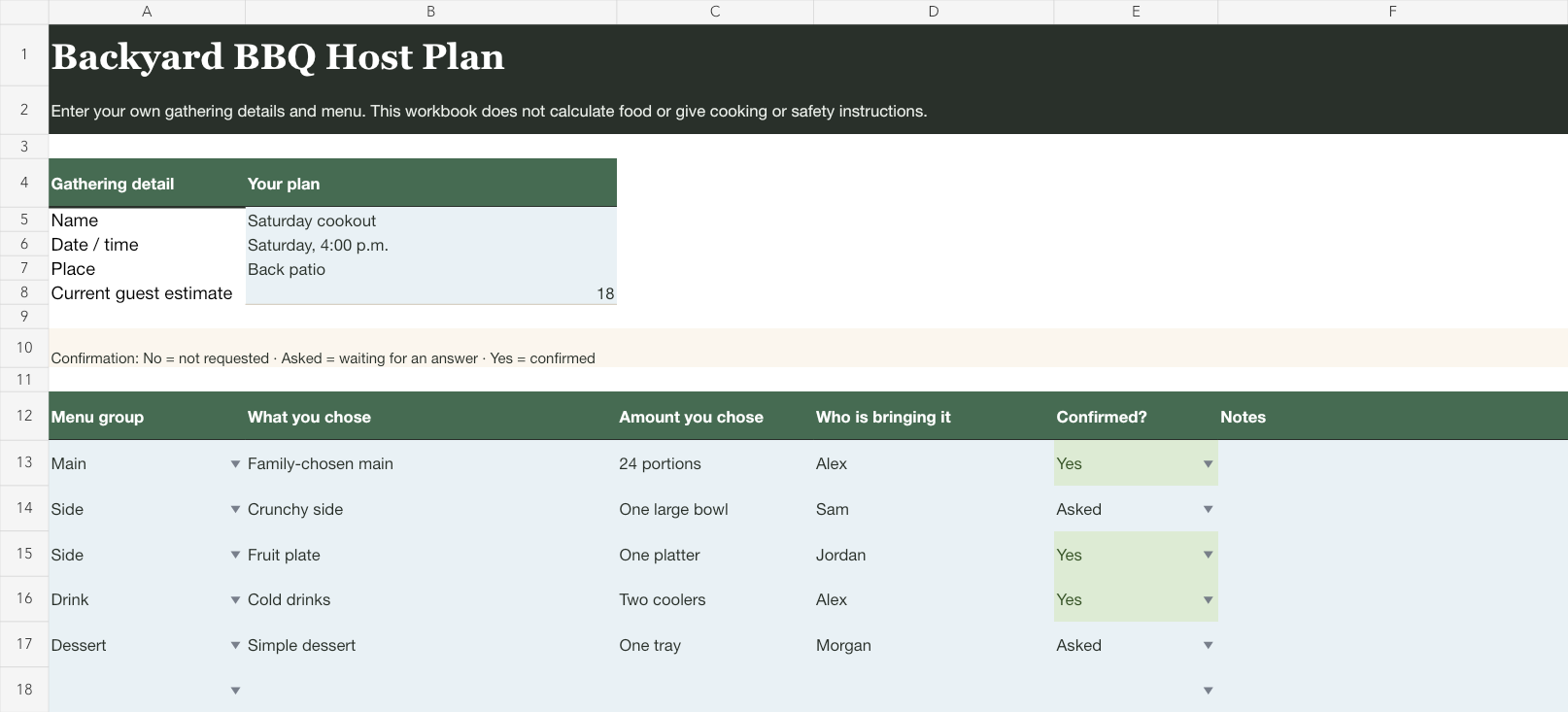
Download the editable BBQ checklist (Excel workbook)
The workbook has two sheets. Host Plan stores the gathering details and menu choices. Setup & Tasks holds the physical handoffs and their owners. It also records timing and confirmation state. Delete any example row that doesn't belong at your cookout. Keep cooking and equipment decisions with the responsible people. Use the same rule for food handling, allergies, alcohol, weather, and child safety.
Take one lap from the gate to the table
Before writing tasks, walk the path a guest will take. Start where people arrive. Continue to the chairs and food table. Finish at the place used for empty plates. You aren't designing a perfect party route. You're noticing the physical handoffs the meal creates.
Write a row when that lap exposes an action: bring six chairs down, clear one end of the patio table, place cups beside the drinks, or put the chosen waste bags where guests can see them. Each instruction names an object and a destination, so another person can finish it without asking what set up outside meant.
Now add the date, place, and current guest estimate. The estimate can change. Its job is to give the host one visible number to update instead of leaving several counts scattered across messages.
If invitations are still moving, use the party guest list template to track replies. Bring only the current estimate into this checklist. You don't need every phone number and invitation note duplicated in the cookout file.
One sentence can anchor the sheet: Saturday cookout on the back patio, with food served around five. It tells a helper which space and meal the rows describe without pretending the afternoon will run by the minute.
Write the menu your household actually chose
The menu section begins empty. Add each chosen main, side, drink, or dessert as its own row. If someone else is bringing it, put their name beside it and use the confirmation field.
Keep the amount column in the host's own language. One large bowl may be clearer than a formula. The same is true of two trays or our usual pitcher. The amount is the host's decision, recorded where the person bringing it can see it.
This separation catches a surprisingly common gap. A dish can be settled while the bowl, serving spoon, or person bringing it is still missing. The lonely serving spoon isn't a menu problem. It's an ownership problem, and the next sheet is where it belongs.
Give each dish a landing place
Read down the chosen menu and picture each dish arriving at the table. Where will it land? What serving piece will sit with it? Who brings both out? Add only the cups, napkins, utensils, and containers your host plan uses.
Avoid turning the workbook into an inventory of everything in the kitchen or yard. A useful row changes what somebody does. Set out the large salad bowl and spoon has a visible finish. Serving supplies is a category that will still need interpreting when guests arrive.
The same rule applies to seating. Record the arrangement you've chosen, not advice about where anyone should sit. If chairs need to move from another room, that movement is a task with an owner. If the seating is already in place, the row can disappear.
Give setup work a real owner
An item becomes part of the plan when somebody knows they own it. Put one name beside each active setup row. Use two names only when those people have actually agreed to share the task.
Everyone will help sounds generous, but it doesn't tell anyone who will notice the missing cups. A named owner can still ask for help. The name simply keeps the noticing work from returning to the host by default.
Use the status choices as a small conversation: Open means nobody has claimed it, Asked means a request is waiting for an answer, Ready means the arrangement is settled, and Done means the written finish line is true. Skip removes a row without deleting it if you may reuse the workbook later.
Plan cleanup before the first full plate
Cleanup usually becomes visible at exactly the wrong moment. A guest is holding a full plate, the nearest bag is still under the sink, and the host is trying to remember where spare napkins went.
Add the chosen waste bag and dish landing spot to the setup sheet before guests arrive. Include leftover containers only when they're already part of the host's plan. These are location and ownership notes, not disposal or food-storage guidance. Ask where the things already in use will go when someone is finished with them.
Give the final reset a person too. That may mean collecting borrowed serving pieces, returning chairs, or putting the host's chosen supplies away. A cookout can end casually while still having a clear last task.

Read the sheet once as a helper
Hand the sheet, literally or imaginatively, to someone who didn't create it. Scan only the active rows. A blank status belongs to a blank row; Open means real work without an owner or settled plan, and Asked means a named request is waiting for an answer. If a helper can't picture the finish, rewrite the task before adding more rows.
Save the file only if it will remove setup work next time. Clear the menu and guest estimate before reusing it, because a different gathering deserves fresh choices.
If your household uses Mavo, you can add one shared family-calendar event for setup. Assign the people who agreed to handle it. Keep the menu and detailed rows in the workbook. Mavo doesn't import the file or calculate food, and it doesn't decide how the cookout should run.
For a holiday meal with a more detailed menu handoff, use the Thanksgiving menu planner. For other gatherings, browse the family hosting guides.