Hosting & celebrations · July 19, 2026 · 8 min read
First Birthday Party Checklist: A Calm Timeline
Use this first birthday party planning checklist to track guests, costs, bookings, deadlines, and party-day owners in a free spreadsheet.

Every addition to a first birthday party has a consequence somewhere else. Six more guests can change the place. A different place can shorten the party window or add a booking. A booking can use money that was meant for food, photos, or decorations. A handmade detail can add work to the final week even when it barely changes the party itself.
A useful first birthday party checklist keeps those consequences visible. Decide the party date, party window, one-sentence party description, place, guest cap, and spending limit before the list starts growing. Then ask what each new invitation, purchase, or booking changes in people, money, time, place, or party-day work.
The goal is a party whose parts fit the boundaries your family chose, whatever size those boundaries allow.
Choose a celebration size you can carry
Start with one sentence describing the party. Keep it concrete:
- "Ten relatives at home for two hours, with simple decorations and one family photo."
- "Twenty guests in the park pavilion, with borrowed tables and two setup helpers."
- "A booked room where the venue handles setup, with our family owning invitations, photos, and gifts."
That sentence sits beside five other boundary facts:
- Party date: the date invitations, bookings, and due dates must agree on.
- Party window: the start and finish of the gathering, not the whole setup and cleanup day.
- Place: the home, yard, park, or booked room that determines access, capacity, and reset work.
- Guest cap: the maximum number of people you are willing to host, set before the invitation list turns into a collection of exceptions.
- Spending limit: the total the family is willing to spend, not an estimate assembled after the purchases are made.
Now test additions by consequence. If six more invitations exceed the guest cap, the decision isn't only about six names. It may require a larger place, more food, a changed budget, and more setup. If a booked venue shortens the available window, a long activity plan may no longer fit. If a decoration needs two hours of assembly, those hours belong in the final-week workload before you say yes to it.
The consequence doesn't automatically mean no. It means the choice has to fit somewhere. You can raise a cap, change the place, move money, simplify another part, or decline the addition. What doesn't work is accepting the addition while pretending none of the boundaries changed.
Work the first birthday party planning timeline
This countdown starts six weeks before the party. If you're closer than that, begin at the current row and pull forward only the unfinished decisions. Don't recreate work that no longer matters.
Use the first row to set the boundaries. Use every later row to close the consequences of decisions already made. A booking isn't settled because you like the venue. It is settled when the date, access window, cost, confirmation, and pickup or arrival details fit the party you chose.
| When | Decide or finish | Name the handoff |
|---|---|---|
| 6 weeks before | Set the party sentence, spending limit, date, place, guest cap, and a party window that fits your family's usual day | Who confirms the place and records the current total? |
| 4 weeks before | Send invitations and record any bookings or orders | Who tracks replies and who holds each confirmation? |
| 2 weeks before | Review the guest count, supplies, decorations, activities, and first-year photo or memory plan | Who owns each pickup, delivery, or borrowed item? |
| 1 week before | Confirm the final headcount and every outside booking | Who follows up, and where is the answer recorded? |
| 2 days before | Gather the setup items, birthday outfit and backup, and photo list in the order they'll be used | Who carries them, who opens the space, and who checks the list? |
| Party day | Run setup, arrivals, photos, gifts, the birthday moment, and cleanup | Who owns each moment while the planner steps away? |
Keep bookings and purchases as logistics, not inspiration. Record the provider or store, contact, amount, confirmation, pickup or arrival time, and responsible person. Once a choice is made, another page of alternatives won't help you complete it.
Give first-birthday details their own lines. Record the photo or memory item you want ready and the birthday outfit plus backup, if those matter to your family. Put each one through the same test: what does it cost, when must it be ready, where will it be, and what other work does it create?
Use the free first birthday party planning spreadsheet
Once the boundaries and their consequences make sense, use the free workbook to hold the current answers. It has five tabs. Start Here records the party date, party window, party sentence, place, guest cap, and spending limit, with a live summary. Timeline supplies 16 actions and calculates their dates from the party date. Guest List counts households and actual attendees. Budget & Bookings keeps costs, owners, dates, and confirmations together. Party Day gives six moments a start, finish, owner, and status.
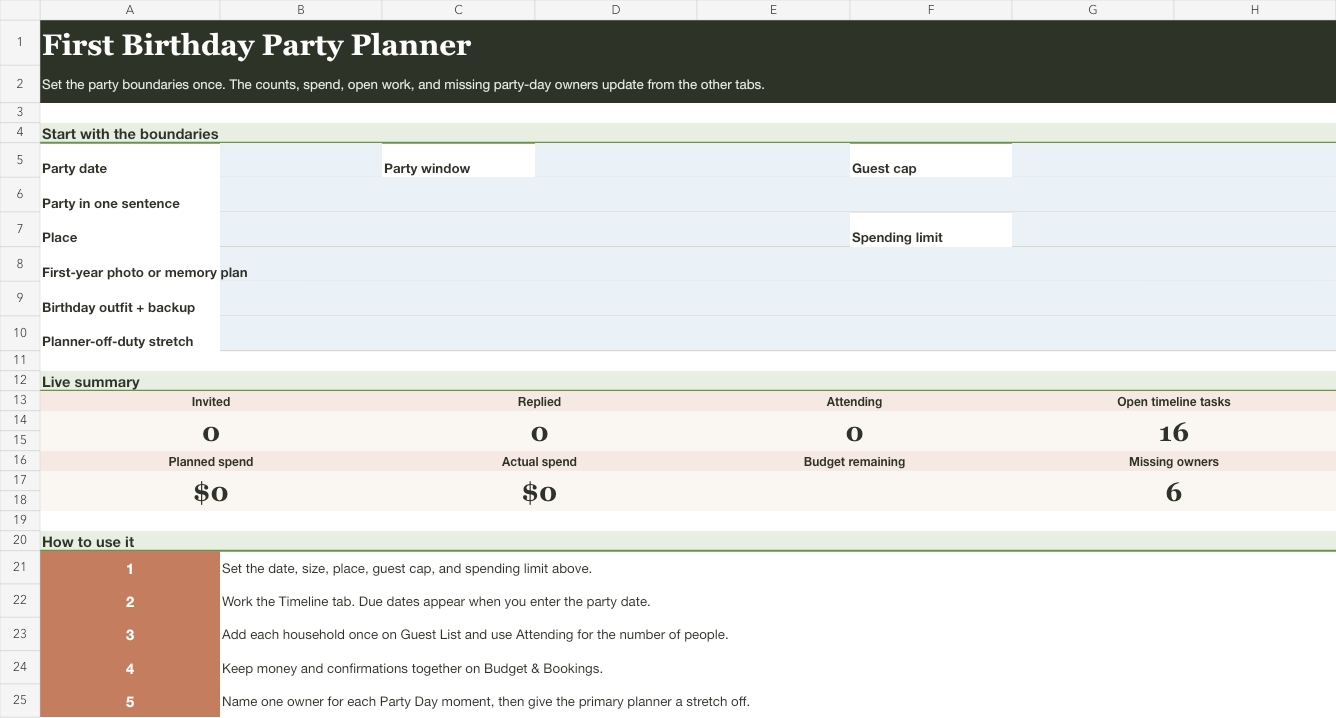
Download the first birthday party planning spreadsheet (Excel workbook)
Open the file in Excel or upload it to Google Sheets. Complete all six fields on Start Here. Then add one household per guest-list row and one actual purchase or booking per budget row. If the guest count or spending total approaches a cap, return to the decision instead of making the spreadsheet look compliant by hiding a row.
If the only moving piece is the invitation response, use the lighter party guest list template to keep household counts and the next follow-up visible.
The workbook calculates dates from the party date and summarizes the rows you enter. It doesn't decide whether a bigger guest list, different place, or new purchase belongs in your party. That judgment stays with your family.
Fill the party-day section before the final week. Use "open" when nobody has agreed to a job. An open line is useful information; a guessed name isn't.
Turn offers to help into six handoffs
Offers to help become useful after the party's shape is settled. Otherwise every helper is working against a plan that may still expand. When someone says, "Tell me what you need," offer one whole piece of the day with a beginning and an end.
- Setup lead: knows when access begins, what needs to be placed, and what "ready" looks like.
- Arrival lead: greets guests, points them toward the gathering, and answers location questions while the planner is elsewhere.
- Photo lead: has the short photo list and knows when to gather the people in it.
- Gift and card lead: keeps one place for incoming items and moves them to the named spot when the party ends.
- Birthday-moment lead: gathers the needed people and tells the photo lead when the moment is about to begin.
- Cleanup lead: knows the reset deadline, what belongs to the family, and who is carrying each load out.


Define the job in observable terms. "Photos" can begin with the first grandparent arrival and finish after the family photo and birthday moment. "Cleanup" can begin when guests leave and finish when borrowed items, family items, and venue items are separated.
Check for collisions before assigning two moments to one person. The arrival lead can't also manage a delivery across the room. The photo lead can't take the family photo and stand in it. If the party's scope needs more work than the available people can do, change the scope. Adding names to overlapping jobs doesn't create more capacity.
Turn the final update into owned jobs
The workbook is enough to plan and run the party. If your family also uses Mavo, a final update can move agreed jobs into the family plan. Paste a note such as "Sam has decorations. Alex is confirming the venue. Photo lead is still open," then review the plan items Mavo creates and assign the agreed work.
Assigned jobs can show as Covered, while an unassigned job remains in Needs Attention. If someone takes a different party job, update the owner so the current handoff stays visible. Mavo doesn't recalculate the workbook, synchronize spreadsheet changes, or decide whether the party has grown past its limits.
This is the same reason a mental load checklist works better with names beside the invisible work. A weekly family meeting can also be the place where you settle the remaining party decisions without turning every evening into a planning meeting. More gathering guides will live in the family hosting collection.
For a Halloween gathering organized around its place in the family's wider holiday plan, use the free Halloween party checklist.
If the party plan is settled and you're choosing what guests take home, the non-candy goodie bag ideas guide helps you pick one complete favor without reopening the rest of the party.
For a multi-household gathering with beds, shared costs, and contributions to settle, use the family reunion coordination kit.
Adjust the workbook to the party you chose
For a small gathering at home, Start Here and Party Day may be all you need. Keep the six boundary facts, guest count, setup, photos, gifts, and cleanup. Skip booking rows and formal activity work that your party doesn't have. Empty space can accurately describe a simple party.
For a booked room, use the booking area heavily. Record access time, contact, remaining amount, pickup or delivery, and the person responsible for the confirmation. Treat the access and reset times as hard edges when judging any addition to setup or activities.
For a backyard or borrowed-space gathering, record borrowed items with their return plan. "Chairs" isn't finished when the party ends. It is finished when the right number are back with the person who lent them. That return is part of the cost in time and work, even when borrowing costs no money.
Give the planner a part of the party off
Choose one part of the party the primary planner doesn't need to operate. It might cover arrivals, the family photo, or the birthday moment. Name what must already be settled for that stretch to work: the party window, the photo list, the place for gifts, and the person responsible for the next moment.
Then stop adding work to that part of the day. If someone proposes another activity or decoration, name the job it creates and the minutes it will consume. Keep it only if the party still fits the size and spending limit you chose at the start.