The mental load · July 31, 2026 · 7 min read
Family Chore List Template: Free Fillable PDF
Use this free family chore list template to group recurring jobs by person, add the day or frequency, and set a review date on one fillable page.
A seven-day grid makes a tidy rectangle. It also makes everyone scan the whole rectangle to find the two or three lines that belong to them. A family chore list can be easier to read when the names come first.
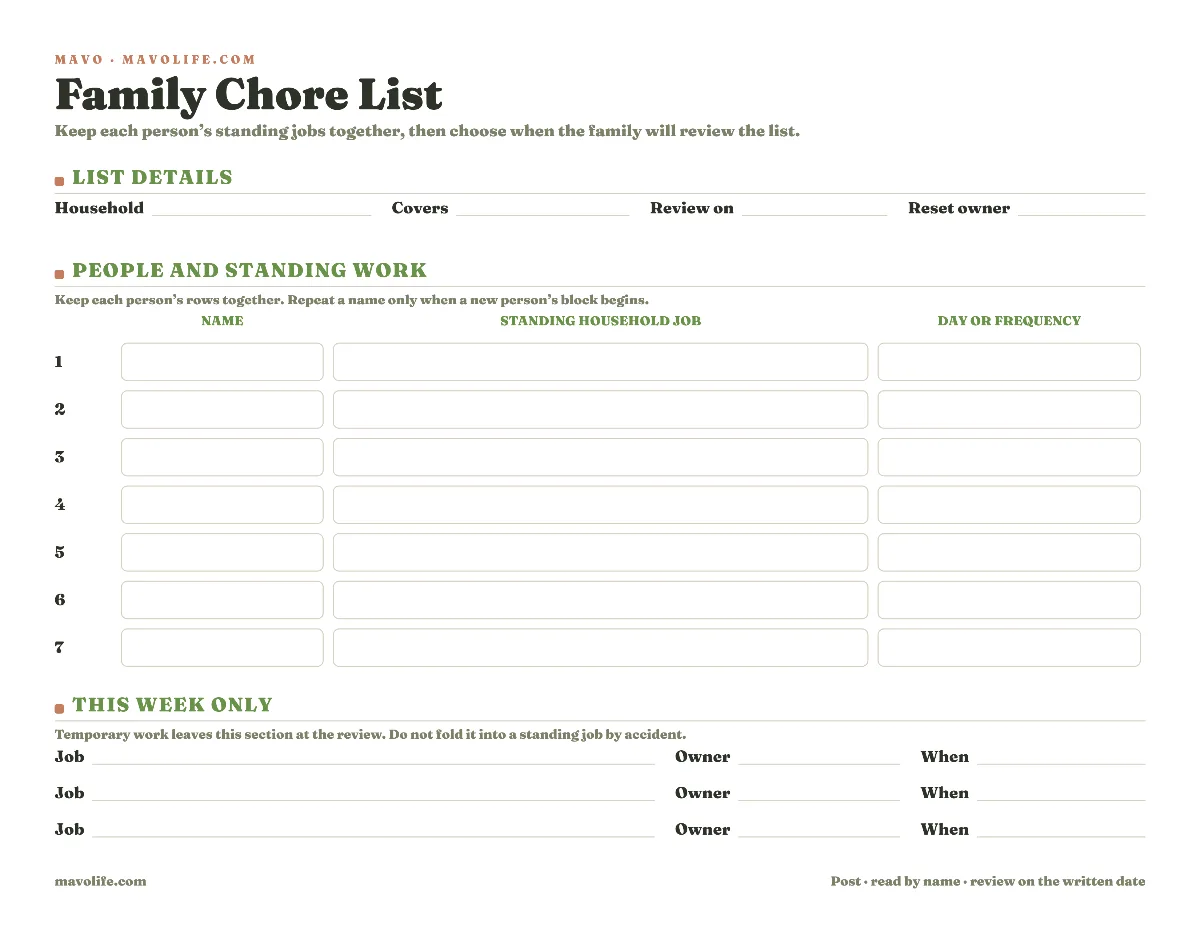
The fillable template on this page keeps each person's standing jobs together and puts the day or frequency beside each line. Temporary work gets its own small section. A written review date tells the family when this version stops being the current one.
Download the free family chore list template
Download the fillable family chore list (PDF)
The landscape PDF has seven rows for standing work and three rows for jobs that apply only to the current week. Type into the file before printing or write on it by hand. No account is required.
Fill it in during one family reset. Write the household name, the period this list covers, the date you'll look at it again, and the person who will bring it back for that review. Then keep each person's rows together. Repeat a name only when the next person's block begins.
Seven rows are intentionally fewer than a complete catalog of everything a home needs. Use them for the recurring jobs whose owner or timing is easy to lose. Keep private reminders and tiny personal habits off the shared page.
Write the names before the jobs
Start by writing the names of the people who will read the sheet. Include the adults when their standing work belongs on the same page. The list should show the household's chosen split, not turn one person's chores into the only work worth naming.
Now give each person one or two adjacent rows. A small example could look like this:
| Name | Standing household job | Day or frequency |
|---|---|---|
| Alex | Empty the kitchen bin | Thursday |
| Alex | Clear the dinner table | After dinner |
| Jordan | Start the towel wash | Saturday |
| Morgan | Return library books to the bag | Sunday evening |
Those are ordinary illustrations, not recommendations about who should do a particular task. Use jobs your household has already chosen and explained. The page doesn't decide what a child or adult can do, and it doesn't set a reward or pay amount.
Keep the same name on neighboring rows. Someone walking up to the page can find one name and read down instead of tracing across seven columns. If a person has no standing job on this version, don't invent one to fill the paper.

If you first need to see the larger load that one parent tracks, use the mental load checklist. That page handles the broad inventory and whole-area handoff. This family chore list starts later, after the household has chosen the small set of recurring jobs that need a visible home.
If the household also wants to write down its own amount-or-points terms beside a smaller set of jobs, the chore and allowance chart keeps that separate conversation and review date on its own page.
Keep standing chores separate from this week only
A standing job repeats in a recognizable way. The kitchen bin goes out every Thursday. Towels start on Saturday. The library bag gets checked on Sunday evening. Those lines can survive until the review date without being rewritten every time the page is read.
Temporary work belongs in This week only. A return package, an extra room reset before guests, or moving a box to the garage may need an owner and a day, but it shouldn't become someone's permanent job because it happened to be on the page once.
At the review, cross out or clear those three temporary rows. Move a job into the standing section only when the family has decided it will repeat. That small boundary keeps the printable from becoming a second running task list.
The refrigerator can turn into a paper museum surprisingly fast. Last month's appointment card, an old lunch menu, and a chore list from the previous school schedule can all remain posted because each page still looks important. The review date gives this sheet a visible exit.
Make the day or frequency readable
The timing cell should answer the next practical question. Weekly may be enough when the family
already knows when the job happens. Thursday after dinner is better when the day and moment are
what people forget.
Use the words your household already understands:
Every morningAfter dinnerTuesday and FridaySaturday before lunchFirst Sunday of the month
Avoid squeezing instructions into that cell. If wipe the counter needs a longer explanation, give
the explanation where the job is taught. The posted list should name the work and its timing, not
become a manual for how to do it.
Keep the timing truthful. A job that happens only when needed can say when the basket is full. A
job that changes hands can stay off this static list or use a shorter review date. The page should
reflect the arrangement the family is using now.
Put a review date on the page
Choose a date when someone can ask whether the names and timing are still accurate. A new split may need another look next Sunday. A settled list might wait until the first weekend of next month or until a school or work schedule changes.
Write one reset owner beside the date. That person doesn't own every unfinished chore. They own the small act of bringing the page back to the family and asking what changed.
Use a short review:
- Read each person's block aloud.
- Remove temporary work that ended.
- Change a name or timing that is no longer true.
- Pick the next review date before posting the replacement.
A crossed-out line is useful evidence that the page was checked. Print a clean copy when corrections make it hard to read. If nothing changed, write the new review date and keep the same arrangement.
Adapt the list to the household
For one person
A private phone note or a lined pad may be faster. Use the printable only when the timing and review date help you see several recurring jobs together. Paper earns the trip to the printer when it gives you something the note wasn't already doing.
For several people
Group adjacent rows by name and keep the list short. When seven standing rows aren't enough, print a second page only if both pages will hang and be reviewed together. Otherwise, move to the free maker described below so a larger weekly grid can stay readable.
Across two homes
Keep a separate list in each home unless everyone genuinely shares one current page. Each sheet should name only the work handled in that home. Don't make one person carry two conflicting paper versions or reconcile which copy has the current timing.
When jobs change every week
Use a shorter review date or choose a configurable chart. A static family chore list is strongest when most lines repeat. Rewriting every row every few days is a sign that the page has the wrong shape for the job.
Use the Chore Chart Maker when the shape needs to change
The printable here is a name-first master list. The free Chore Chart Maker is the better fit when you want a weekly grid with selected days. It can also put several children on one page and offer editable chore suggestions before printing.
Choose one surface and let it be current. Keeping a completed PDF beside a different weekly chart creates two plausible answers. The static list should win when the same small set of jobs repeats and the family reads by name. The maker should win when day-by-day checks or a different layout are the useful part.
The mental load guides cover the larger conversations around who notices and remembers household work, and who carries it. This page can stay with the smaller job it does well.
Print the template and write the names first. Add only the standing jobs the household has already chosen, then circle the review date before the page goes on the wall.
For a one-room reset after play, use the kids cleaning checklist. It names familiar things and their destinations without turning the page into a standing chore list.