Sports schedules · July 23, 2026 · 8 min read
Team Mom Duties Checklist + Free Season Organizer
Use this team mom duties checklist with a free season workbook and field-bag sheet for dates, contacts, assignments, fees, and follow-ups.

A team mom is the parent volunteer who connects the coach with families and the off-field work around a season. The title may also be team parent or team dad; some teams say team manager. In every version, the useful part is the same: someone keeps a current answer moving until the right person has it.
That doesn't make the volunteer the owner of every loose job. It makes them the person who can see when a job still needs a name.
Decide what belongs to this volunteer
Ask the coach or team lead what they want this volunteer to cover. A local team may use only a few of the duties below because its league or coach already handles the rest. Its team app may cover another piece.
Write the answer in one sentence. For example:
I keep the parent contact list and relay current team dates. I also coordinate volunteer assignments and close the optional shirt order.
That sentence belongs at the top of the workbook. It keeps a helpful parent from slowly becoming the automatic owner of every loose task.
Then record where the official information lives. The workbook can point to the current schedule or roster. It can also name the team app or message thread. It shouldn't become a second unofficial rulebook. If a date changes, use the team's current source and update the workbook from there.
For a separate player name-and-number reference, the free team roster maker turns a pasted list into a sideline printout. Keep that sheet apart from the volunteer contacts and assignments in this organizer.
Team mom duties to check with the coach
| When | Check whether this belongs to the team parent |
|---|---|
| Before the season | Confirm the volunteer role. Record the official schedule and roster; add the approved parent channel. Set up a snack or volunteer sign-up only if the team needs one. |
| During the season | Relay changes from the official source. Confirm open volunteer work and route questions to the person who owns the answer. |
| Before games and team events | Confirm the current arrival details. Check the snack or item handoff. Close any event follow-up you accepted. |
| During an order or team request | Share the official instructions and cutoff. Track whether a household confirmed, but keep payment details in the team's approved system. |
| At season closeout | Finish the remaining follow-ups. Return team items; remove personal contact rows. Give the next volunteer a blank organizer with the current source list. |
Delete any row your coach or league owns. Remove the work already covered by the team app too. A shorter checklist with truthful owners is more useful than claiming every possible duty.
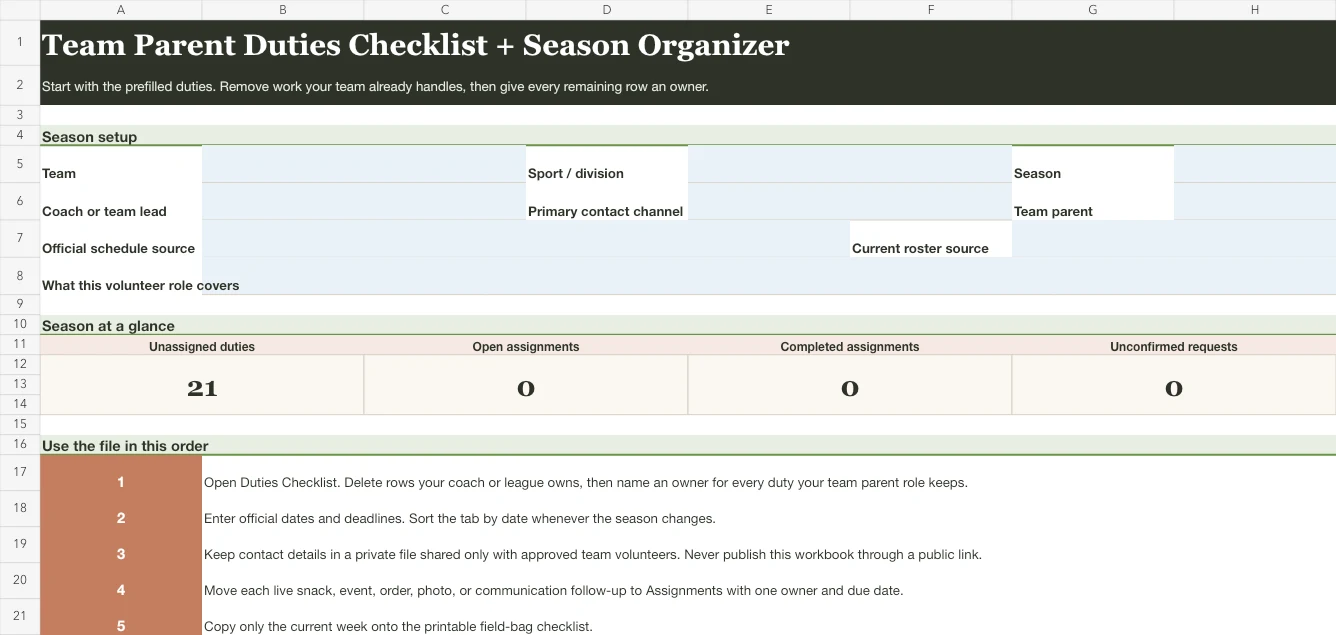
The free workbook contains this list as a working tab. It also holds changing dates and contacts. Assignments and request confirmations stay in their own tabs. A smaller fillable page carries only the current week's handoffs to the field. Both files work without an account; the workbook is compatible with Excel and Google Sheets.
Download the free team mom season organizer
Download the team mom season organizer workbook (XLSX)
The workbook has six tabs:
- Start Here keeps the role and private-sharing reminder beside the live counts.
- Duties Checklist comes prefilled by season phase so you can remove work handled elsewhere and assign what remains.
- Dates & Deadlines holds practices and games alongside meetings; photo dates and order cutoffs fit there too.
- People & Contacts keeps the contact channel and role beside each person.
- Assignments gives each live task one owner and a finish state.
- Money & Orders tracks what was requested and confirmed without replacing the team's official payment or receipt system.
Blue cells are for typing. Date columns contain real spreadsheet dates, so they can be sorted. The Start Here summary counts duties without an owner. It also shows open work beside completed assignments and unconfirmed requests.
Open the file in Excel or upload it to Google Sheets. Another app that supports .xlsx files works too. No Mavo account is required.
Keep contact details in a private file shared only with approved team volunteers. Don't post the workbook through a public link. Use the team's official directory when one exists, and remove contact rows when the season ends.
Turn the checklist into this season
Open Duties Checklist first. Mark a row Remove when someone else owns it. When the duty stays, add the volunteer's name and change the status from Unassigned. You now have the role your team agreed to, not a generic list.
Next, copy the current dates from the official team source. Use a separate row for each fixed point, and add an owner only after that person accepts the handoff. A blank owner cell is useful because it shows that the work is still waiting.
Move only active follow-ups into Assignments. “Set up snacks” may remain one duty, while “Confirm the snack owner for the August 22 game” becomes a dated assignment. Keep the contact tab limited to details the team has asked you to use.
The workbook can hold 30 dates. What you carry to the field should not.
Before a practice, open Dates & Deadlines, filter to the current week, and take a photo of it. That's the whole field-side version: this week's dates, whoever still owes something, and the number of the person who knows the rest. Copying it onto a paper sheet by hand gives the schedule a third place to be wrong, and that copy is the one most likely to be stale, because it only updates when you remember to redo it.
Medical and safety information belongs in the team's approved place, not in a general volunteer's notes.
Give every assignment a finish line
“Handle snacks” is a category. “Confirm the snack owner for the August 22 game” is an assignment.
The second version gives the owner something they can finish. It also lets the volunteer choose a truthful state: not started / waiting / in progress / done. “Waiting” is often more useful than a hopeful checkmark.
For recurring work, create one row per date rather than one enormous season-long task. The person covering the first game may not cover the third. If your team uses a dedicated rotation, the team snack schedule sign-up sheet gives that one job a fuller roster.
Avoid copying your own name into every empty owner cell just to make the sheet look complete. An empty cell is a request for a volunteer. Your name in twelve rows is twelve promises.
When the work affects your household's schedule, you can also put the date in Mavo's shared calendar and name which adult in your household is handling it. Covered status then shows whether your part is handled. Mavo doesn't replace the team's official channel or run its payment records; it keeps your household's piece visible beside everything else.
Send messages that close one loop
A team-parent message works best when it asks for one kind of response.
Use a simple shape:
- What changed or needs a decision. Put the current fact first.
- Who needs to respond. Name the group or assigned person.
- When the reply is needed. Use the real due date from the workbook.
- Where the current detail lives. Point to the official source.
For example:
Saturday's game now uses the updated time in the team app. The two open volunteer assignments are listed below. Please claim one by Thursday evening, then reply in this thread so I can mark it confirmed.
That message doesn't require a speech about the whole season. It closes the date change and the two open assignments. The workbook records the result.
If several updates arrive together, send the one that changes what families must do first. Save background detail for the people who need it. A short current answer is kinder than forwarding a long chain and asking everyone to excavate it.


Make the system fit the team
For a short recreational season, you may need only the duties and dates tabs. Keep contacts only when the role requires them. Hide Money & Orders if nobody uses it. A smaller file that stays current is better than a complete planner nobody opens.
| If your team works this way | Change the organizer this way |
|---|---|
| Two team parents share the role | Divide the duties by season phase or category. Keep both sets in one file so either volunteer can see the current owner. |
| The league or coach already runs a process | Mark the duty as handled elsewhere and point to that current source. Don't rebuild its schedule or order process. Leave its sign-up where families already use it. |
You can also use one family calendar for the sports season when the team schedule starts colliding with school and work. Another child's activities can go in the same family view. The sports schedules guides cover the other handoffs around a family's season.
For one household's player bag and sideline tote, the sports mom essentials checklist gives every repeat item a home and keeps the current game additions small.
Close the season without carrying it home
Near the last event, filter the Assignments tab to anything that isn't done. Close the real follow-ups. Move official records to the place the team requires, then mark requests or orders with their final state.
Then make a clean copy of the workbook if another season will use the same shape. Remove personal contact details and team-specific notes before reusing or sharing it. Keep the empty structure, not last season's people.
The last useful team mom duty is making the role easy to hand off. Give the next volunteer the blank workbook and the one-sentence role. Add the names of the official sources. They can start with a file that explains itself instead of inheriting a mystery folder and your memory.