Trips & packing · August 31, 2026 · 6 min read
Diaper Bag Checklist for Packing and Reset
Use this diaper bag checklist to track your family's chosen items, packed state, replenish point, reset owner, and caregiver handoff notes.

If your family has already decided what belongs in the bag, this diaper bag checklist keeps those choices usable after the first outing. Before leaving, it says what's packed. After coming home, it says what needs attention before anyone takes the bag out again.
This is an organizer, not care guidance. Use your pediatrician's advice and product labels to decide the contents and quantities. The checklist records those decisions so another caregiver doesn't have to reconstruct them.
Use one current packed state and one replenish point for each row. Name an owner only when someone has agreed to reset it. A bag can look full while one of those questions is still open.
Start with your family's chosen items
If you came looking for what to pack in a diaper bag, begin with the guidance you already trust. That might include instructions from your pediatrician, directions on product labels, and choices your household has made for a particular child and outing. Copy the item names in the words your caregivers use at home.
Don't begin with somebody else's enormous master list. A universal list can turn optional categories into implied requirements. It can also hide the choices that matter to the person holding your actual bag.
Start with a blank row for each family-selected item. Add a quantity only after your household has decided it. The workbook records that decision; it doesn't calculate how much is enough.
If you still need help deciding what belongs in the bag, pause the setup. Ask your pediatrician about care questions and read the instructions for the products you plan to use. Return to the checklist once those choices are settled.
Use two signals: packed and replenish
A single checkbox has a short memory. It can show that somebody packed an item once, but it doesn't say whether the mark is current or whether the remaining amount is ready for the next outing.
Give each row a packed state that describes what a caregiver can verify now. Keep the choices plain:
- Packed: the family's chosen amount is in the bag.
- Add before leaving: the item isn't in the bag yet.
- In use: it has been taken out temporarily.
- Skip this time: the family decided it doesn't belong on this outing.
Then add a separate replenish when field. This is written by the family. It might be a threshold, a date, or a phrase that another caregiver understands. The checklist does not supply that trigger or decide whether it is appropriate.
Keeping the two fields apart prevents a familiar spreadsheet problem. A row can be packed for today's outing and still need replenishing before the next one. Another row may be well supplied at home but absent from the bag right now. One checkmark can't describe both situations.
Copy this blank diaper bag checklist
You can paste this table into a note, document, or spreadsheet. Add only items your family has already chosen.
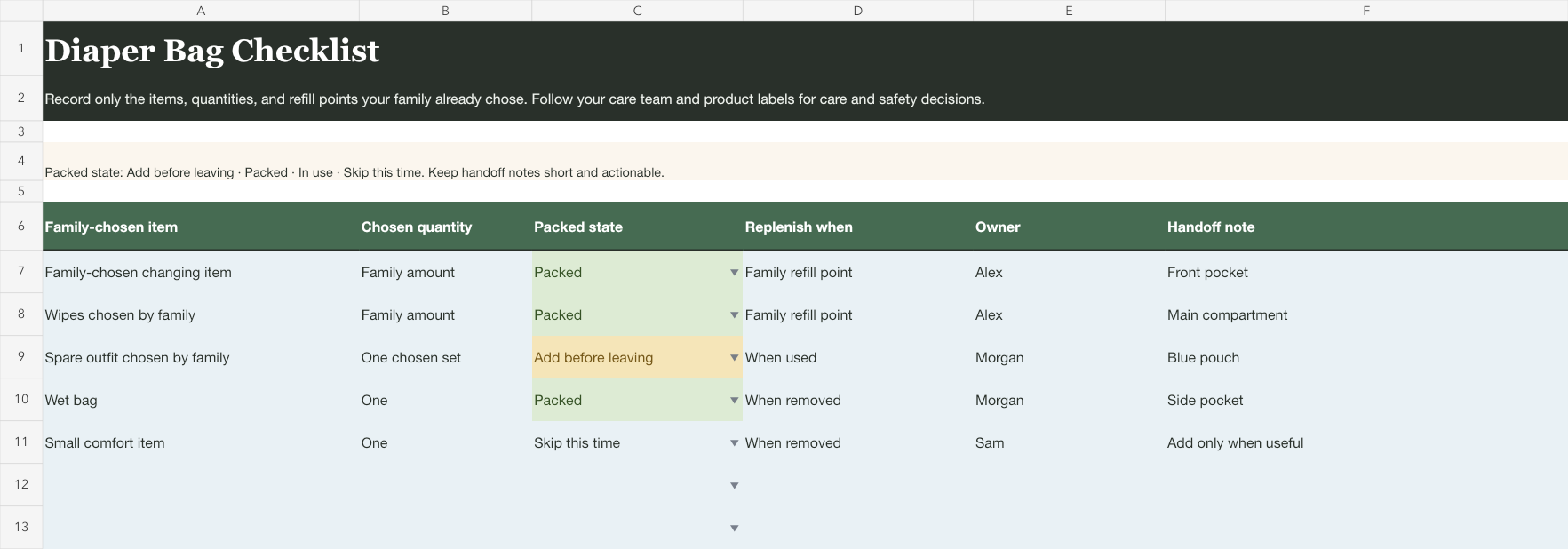
| Family-selected item | Chosen quantity | Packed state | Replenish when | Owner | Handoff note |
|---|---|---|---|---|---|
Keep the handoff note short enough to read while standing beside the bag. A useful note changes what the receiver does: In use. Return to front pocket after the outing. A vague note such as remember this sends the work back into somebody's head.
The owner field names the person handling the next action. It isn't a permanent assignment and it doesn't say who should carry the bag. If a row has no action, leave the owner blank. If one person agrees to replenish it, use their name rather than parent or someone.
Download the reusable diaper bag workbook
Download the editable diaper bag checklist workbook (Excel)
The editable workbook keeps the six fields together and opens with blank rows rather than a suggested diaper bag essentials checklist.
Use the workbook when the bag changes often or another caregiver needs to read the reset. If one person uses one stable bag and a short phone note already works, keep the note.

Run a reset instead of rebuilding the list
A reset begins when the bag comes back, not when the next outing is already underway.
- Open the bag and the checklist together.
- Read each existing row. Don't add new categories because an empty workbook cell looks lonely.
- Update the packed state from what you can verify.
- Compare the current row with the family's own replenish point.
- Put a name only on the action somebody has agreed to handle.
- Replace stale handoff notes with the one detail the next caregiver needs.
The stale-checkmark test helps here. If you can't tell whether a mark came from this reset or last week's, clear it and use a current state. The checklist should describe the bag a caregiver is about to receive, not preserve a tiny history of every successful outing.
Avoid adding a long journal to the handoff-note column. Keep care decisions and records in the channels your family and care professionals already use.
Read the bag like the next caregiver
When the reset looks finished, switch roles for one minute. Imagine you didn't pack the bag. Read only the rows that aren't marked Packed or Skip this time.
Can you tell what needs to happen? Is the person named? Does the handoff note point to an action or location? If you have to ask the person who built the sheet what a row means, rewrite that row while the answer is available.
This check is especially useful when another caregiver will receive the bag. It doesn't replace a conversation about the child or the outing. It keeps bag-specific actions from being buried inside that conversation.
A very full bag can make this test oddly revealing. The zipper closes, every pocket has something in it, and the one open row is still the only thing another person needs to act on. Fullness isn't a state. The written row is.
For a whole-family trip, use the family vacation packing list. It divides personal luggage, shared gear, and pack-last items across a trip. This checklist stays with one recurring caregiver bag and its next reset.
Put the next reset on the family plan
Once the workbook shows an open action, put that action where the family will see it.
If your family uses Mavo, add a shared task for the bag reset and assign the person who agreed to handle it. A reminder can put that task back in view before the next planned outing. The workbook still holds the family's item choices and handoff notes; Mavo doesn't import the sheet or monitor the bag.
Before handing the bag over, ask the receiver to read the open rows. If each one names an action they understand, the checklist is current enough to use.