School emails · July 10, 2026 · 7 min read
Half that school packet is still on the counter
The first-week packet is a dozen forms, each with its own deadline. A printable checklist, what every form is for, who has to sign it, and what to copy.
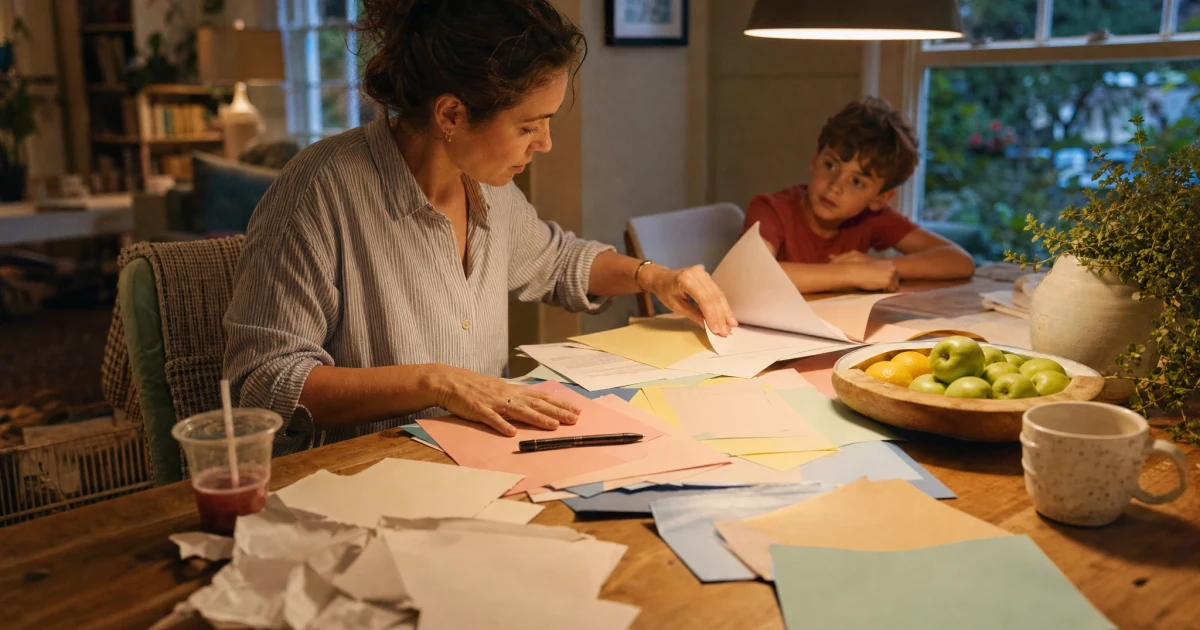
The packet has been on the counter since last week and you have signed maybe three things in it: registration, an emergency card, a photo release, a handbook you agreed you had already read, a lunch account with no money in it, and a stack of sheets underneath that all look vaguely important and vaguely the same.
None of it is hard. The pile is the problem. A dozen forms, some for one kid and some for the other, a couple that need both parents, one that wants a copy of the immunization record, and no way to tell by looking which one is already late. Miss that one and your kid is the only one who can't ride the bus, or can't open the school laptop, or comes home in week three with a note about the lunch account.
So here's the whole pile as one list you can clear in a sitting. Print it, or fill it in on your computer, then write in your kids' names and work down the columns. What each row means comes right after.
The whole pile on one page
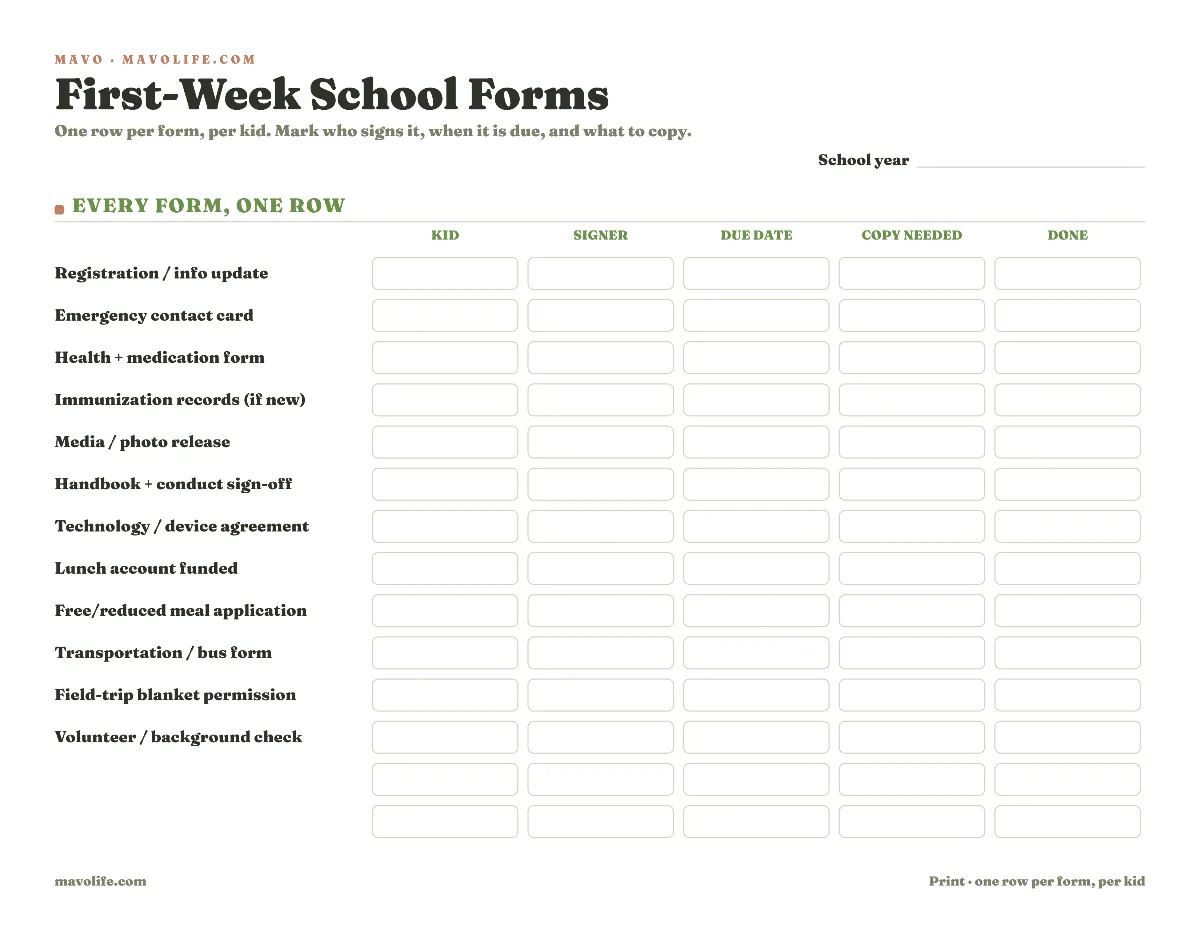
Download the printable forms checklist (PDF)
The blank row at the bottom is for the one your school invents that nobody else's does: a spirit-wear order, a classroom wish list, a "getting to know your child" letter. Add it when it comes home.
What each form in the pile is for
You can fill the checklist faster once you know what you're signing. Here's the standard pile, grouped.
Registration and info update. This confirms what the school already half-knows: your address, your phone numbers, who to reach in an emergency, and sometimes proof you live in the zone. Many districts do this part online now, in the parent portal, before the first bell rings.
The emergency contact card. Who to call when they can't reach you, who's allowed to pick your kid up, allergies, the pediatrician. This is the one form you want a copy of for yourself, because it's the same information a babysitter or a grandparent needs when you're out.
Health and medication forms. A short health history, plus a medication authorization if your kid takes anything during the school day. That one often needs the doctor's signature too, so it's the slowest form in the pile to turn around. If you're new to the district, immunization records usually ride along here.
The media or photo release. Permission to use your kid's name and picture in the newsletter, the yearbook, the school website, and sometimes the local paper. Signing this one without reading it is still a decision. Federal privacy law treats a student's name and photo as "directory information" the school can share, but only after it tells families and gives them a written chance to say no. Pick yes or no on purpose, not because the sheet happened to be on top of the stack.
Handbook and conduct sign-off. You sign that you've read the student handbook and the code of conduct. Older kids often sign their own. The handbook is worth a real skim before you sign for it, because it usually hides the year calendar: every early release, teacher workday, and day off. Those are childcare problems in disguise, and the ones you catch in August don't ambush you the night before. If that's your fall, sort out the no-school days now, while they're still eight weeks away.
Technology or device agreement. For the school laptop or tablet, sometimes with a fee or an insurance opt-in attached. The kid usually signs this one too.
Lunch account and meal benefits. Two different things people mix up. One is funding the account so your kid can buy lunch. The other is the free or reduced-price meal application, which is worth filing even if you're not sure you qualify, since it can unlock other fee waivers.
Transportation. Bus assignment, or a note on how your kid gets home. Some schools want it even when the answer is "walks out the front with a parent."
Field trips and volunteering. Some schools fold a blanket walking-field-trip permission into the first-week pile. And if you plan to help in the classroom or chaperone, the volunteer form (often with a background check) has a longer lead time than you'd guess, so start it early. The single slips that come home before every trip all year are a separate, ongoing job with its own rhythm; a running permission slip tracker is built for those.
Three columns that keep a form from coming back late
The Form name column is the easy part. The other three are what save you.
Signer. Most forms take any parent, but not all of them. Custody arrangements, forms that need both guardians, the tech agreement your middle-schooler signs, the health form your doctor has to sign. Writing down who signs means the form doesn't sit on the counter waiting for the one person who happens to be traveling that week.
Due date. The pile hides a whole range of deadlines under one delivery date. Registration is often due before day one. The handbook sign-off usually rides the first week. The meal application is rolling, but the sooner it goes in, the sooner it counts. Give each row a real date instead of "soon," and the one that was due last Friday stops hiding behind the one due in November.
Copy needed. A few forms you want a copy of before they vanish into the school's files: the immunization record, any custody or court document, proof of residency, and the finished emergency card. Everything else can go back without a copy and never trouble you again.
Snap each form as it comes home
Here's how the pile usually fails. The forms land over the first few days, get stacked by the door, and you sign the top few during a commercial break. The photo release gets signed without a decision. The lunch account never gets funded. The volunteer form surfaces in October, the week after the trip you wanted to chaperone.
In a stack, every sheet looks the same. There's no date on it, nobody's name on it, and nothing to tell you which one already blew past its deadline.
Snap a photo of each form as it lands and add it to Mavo. Mavo AI reads it into a plan item, and you set the two things the counter can't hold: who signs it and when it's due. Now "the green sheet" is "Dad signs the field-trip form by Friday," sitting in the shared plan where both parents can see it instead of in one person's pile.
When the person who signs isn't the one who mails it back, make the return its own step with its own owner, so it doesn't land by default on whoever happened to sign. Add a reminder a day ahead and the deadline surfaces on its own, not on the morning it's already late. Anything still missing an owner stays in Needs Attention until someone picks it up, which is a lot harder to ignore than a form face-down under the mail.
Four questions that come up every fall
What about the ones that are all online now? Plenty of districts moved registration into a parent portal, so half your pile might be a login and a "complete these tasks" screen. Treat it the same way: the portal has its own list and its own deadline. Forward the confirmation email or paste the portal link into your plan, and the online tasks land next to the paper ones instead of getting finished only in your head. The newsletters and picture-day notes that keep arriving after week one are a year-round habit of their own, and turning school emails into dates and to-dos is what keeps those from piling up the same way.
One kid or several? The list runs per kid, which is the whole reason the Kid column exists. Two kids can bring home the same forms with different due dates, different signers, and a photo release you said yes to for one and no to for the other. One row per form per kid keeps them from blurring into a single guess.
What needs a copy? Keep a copy of anything you'd hate to reproduce from memory: immunization records, custody or court documents, proof of residency, and the completed emergency and health info, since that's the sheet a caregiver needs when you hand your kid off. The rest can go back to the school as-is.
Isn't this just tracking permission slips? Different job. This is the one-time, day-one bundle you clear once and mostly forget. The slips that trickle home before every field trip run all year on their own clock, and the inbox flood is its own thing again. Naming which pile you're staring at is half of not drowning in it.
The pile only feels heavy because it all lands in the same week, every sheet wearing the same official-looking font. Written out one row at a time, with a name and a date on each, it's a dozen small tasks, mostly signatures, plus a couple of things to photograph before they go back. Clear them while the first-day photo is still the newest thing on your phone, before October's paper lands on top of September's.